The hardware and bandwidth for this mirror is donated by dogado GmbH, the Webhosting and Full Service-Cloud Provider. Check out our Wordpress Tutorial.
If you wish to report a bug, or if you are interested in having us mirror your free-software or open-source project, please feel free to contact us at mirror[@]dogado.de.


{talib} provides
fast R bindings to the TA-Lib C library for OHLCV
data: technical indicators, candlestick pattern recognition,
rolling-window utilities, and composable financial charts. It is
designed for researchers, analysts, and quant developers who need
technical-analysis features in R without building a heavy dependency
stack. Core computations are executed in C through .Call(),
while charting support is available through optional {plotly} and {ggplot2} integrations.1
The API covers 150+ TA-Lib-backed functions across momentum, overlap, volatility, volume, cycle, price-transform, rolling-statistics, and candlestick-pattern families, including 61 candlestick pattern detectors.
| Need | {talib} |
|---|---|
| Technical indicators | TA-Lib-backed moving averages, momentum, volatility, volume, cycle, and overlap studies |
| Candlestick patterns | Built-in Japanese candlestick pattern recognition |
| OHLCV workflows | Works directly with open, high, low, close, and volume columns |
| Performance | Computation delegated to C routines
through .Call() |
| Charts | Composable financial charts with optional
{plotly} and {ggplot2} support |
Install the release version from CRAN:
install.packages("talib")Install the development version from GitHub:
pak::pak("serkor1/ta-lib-R")All functions provide S3 methods for <xts>,
<data.frame>, <matrix>, and—where
applicable—<vector> inputs. The general convention is
simple: the output uses the same container type as the input.
## calculate the
## relative strength index
relative_strength_index <- talib::RSI(
    talib::GOOGL
)

## check class equivalence
inherits(
    relative_strength_index,
    class(talib::GOOGL)
)
#> [1] TRUE

## display results
tail(
    relative_strength_index
)
#>                 RSI
#> 2021-12-22 53.47421
#> 2021-12-23 54.45979
#> 2021-12-27 56.42226
#> 2021-12-28 53.37121
#> 2021-12-29 53.28979
#> 2021-12-30 52.07450
Indicator outputs preserve input length, which keeps results aligned with the original OHLCV rows.
## combine multiple
## indicators
features <- cbind(
    talib::relative_strength_index(talib::GOOGL),
    talib::bollinger_bands(talib::GOOGL),
    talib::engulfing(talib::GOOGL)
)

tail(features)
#>                 RSI UpperBand MiddleBand LowerBand CDLENGULFING
#> 2021-12-22 53.47421  149.1432   144.4920  139.8408            0
#> 2021-12-23 54.45979  149.2513   144.5318  139.8124            0
#> 2021-12-27 56.42226  149.6263   144.8180  140.0097            0
#> 2021-12-28 53.37121  149.7444   144.8758  140.0072           -1
#> 2021-12-29 53.28979  149.8398   145.1137  140.3876            0
#> 2021-12-30 52.07450 149.7308 145.3711 141.0115 -1{talib} comes with
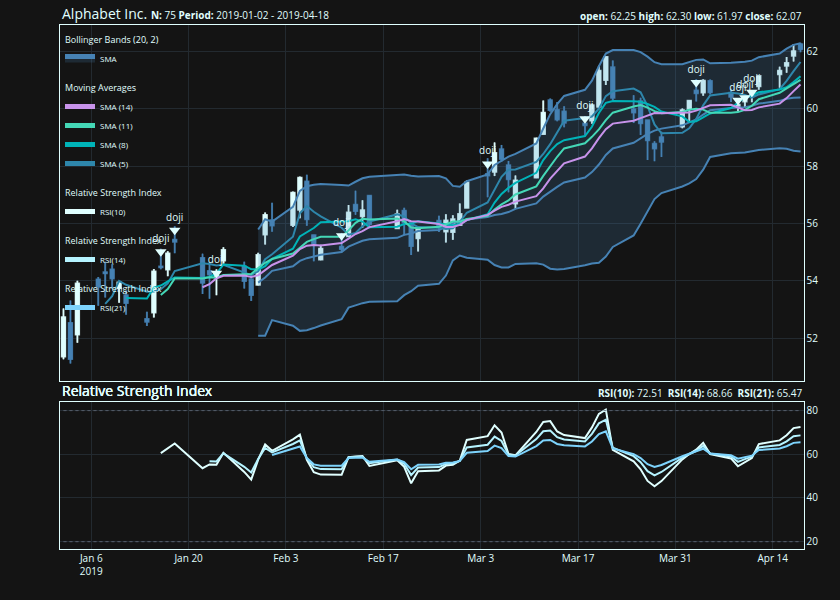
a composable charting API built on two core functions:
indicator() and chart()—both functions are
built on model.frame for maximum flexibility:
## subset data and
## store as 'GOOGL'
GOOGL <- talib::GOOGL[1:75, ]

## construct chart in a brace block
## alternatively use `|>`
{
    ## initialize main chart
    talib::chart(
        x     = GOOGL,
        title = "Alphabet Inc."
    )

    ## add Bollinger Bands to
    ## the existing chart
    talib::indicator(
        talib::BBANDS
    )

    ## add Simple Moving Averages (SMA)
    ## to the chart in a loop
    for (timePeriod in seq(5, 15, by = 3)) {
        talib::indicator(
            talib::SMA,
            timePeriod = timePeriod
        )
    }

    ## similar subchart indicators
    ## like the Relative Strength Index
    ## can be grouped to avoid repeated
    ## subpanels
    talib::indicator(
        talib::RSI(timePeriod = 10),
        talib::RSI(timePeriod = 14),
        talib::RSI(timePeriod = 21)
    )

    ## identify Doji patterns
    ## and add them to the chart
    talib::indicator(
        talib::doji
    )
}
Functions use descriptive snake_case names; each is aliased to its TA-Lib shorthand for compatibility with the broader ecosystem, and to a camelCase name for consistency across R’s finance ecosystem:
| Category | TA-Lib (C) | {talib} | {talib} alias | {talib} camelCase alias |
|---|---|---|---|---|
| Overlap Studies | TA_BBANDS() |
bollinger_bands() |
BBANDS() |
bollingerBands() |
| Momentum Indicators | TA_CCI() |
commodity_channel_index() |
CCI() |
commodityChannelIndex() |
| Volume Indicators | TA_OBV() |
on_balance_volume() |
OBV() |
onBalanceVolume() |
| Volatility Indicators | TA_ATR() |
average_true_range() |
ATR() |
averageTrueRange() |
| Price Transform | TA_AVGPRICE() |
average_price() |
AVGPRICE() |
averagePrice() |
| Cycle Indicators | TA_HT_SINE() |
sine_wave() |
HT_SINE() |
sineWave() |
| Pattern Recognition | TA_CDLHANGINGMAN() |
hanging_man() |
CDLHANGINGMAN() |
hangingMan() |
The main difference between the R and Python interfaces is how OHLCV
series are passed into each indicator function. Below is an example of
identifying Doji patterns in R and Python.
In Python, each series is passed independently:
import numpy as np
import talib

o = np.array([1, 1, 1, 1, 1, 1, 1, 1, 1, 1, 1], dtype=float)
h = np.array([2, 2, 2, 2, 2, 2, 2, 2, 2, 2, 2], dtype=float)
l = np.array([1, 1, 1, 1, 1, 1, 1, 1, 1, 1, 1], dtype=float)
c = np.array([2, 2, 2, 2, 2, 2, 2, 2, 2, 2, 1], dtype=float)

print(
    talib.CDLDOJI(o, h, l, c)
)
In R the series are passed as a tabular container:
ohlc <- data.frame(
    open  = c(1, 1, 1, 1, 1, 1, 1, 1, 1, 1, 1),
    high  = c(2, 2, 2, 2, 2, 2, 2, 2, 2, 2, 2),
    low   = c(1, 1, 1, 1, 1, 1, 1, 1, 1, 1, 1),
    close = c(2, 2, 2, 2, 2, 2, 2, 2, 2, 2, 1)
)

talib::CDLDOJI(
    ohlc
)
All default series arguments are handled internally, and the
R interface is therefore higher-level: users pass one OHLC
container rather than manually splitting the series.
Contributions are welcome. For non-trivial changes, please open an issue first to discuss the proposed design, API impact, and testing approach.
This repository vendors TA-Lib as a Git submodule. Clone the repository with submodules enabled:
git clone --recurse-submodules https://github.com/serkor1/ta-lib-R.git
cd ta-lib-R
If you already cloned the repository without submodules, initialize them with:
git submodule update --init --recursiveMost indicator wrappers, helper functions, documentation fragments,
and unit tests are generated from the scripts in codegen/.
The charting interface is maintained separately.
Common development tasks are exposed through Make targets:
make helpSee CONTRIBUTING.md for the full development workflow.
Please note that {talib} is released with a Contributor Code of Conduct. By contributing to this project, you agree to abide by its terms.
These binaries (installable software) and packages are in development.
They may not be fully stable and should be used with caution. We make no claims about them.
Health stats visible at Monitor.