The hardware and bandwidth for this mirror is donated by dogado GmbH, the Webhosting and Full Service-Cloud Provider. Check out our Wordpress Tutorial.
If you wish to report a bug, or if you are interested in having us mirror your free-software or open-source project, please feel free to contact us at mirror[@]dogado.de.
prefviz is a visualisation toolkit for preferential
data, where individuals rank or order a set of alternatives, such as
ranked-choice election ballots, tournament results, or survey rankings.
The package makes it easy to explore both single-contest and
multi-contest preference patterns through three complementary plot
types:
prefviz extends this to high dimensions via animated tours
when there are more than 3 items.prefviz is available on CRAN:
install.packages("prefviz")The development version of prefviz can be installed
via:
# install.packages("devtools")
remotes::install_github("numbats/prefviz")Used when you want to understand how preferences is spread across items in a single contest.
sushi_data <- prefio::read_preflib(
  "00014 - sushi/00014-00000001.soc",
  from_preflib = TRUE
)

irv_result <- dop_irv(sushi_data,
                      preferences_col = preferences,
                      frequency_col   = frequency)

dop_bar(irv_result, items = -c(round, winner), at_round = 1)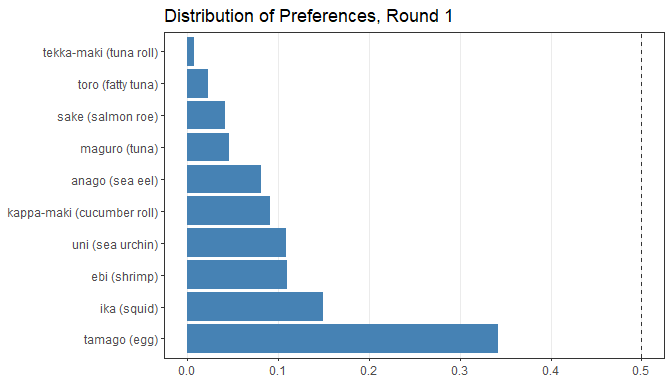
Used when you want to examine head-to-head competition between every pair of candidates and identify Condorcet winners or losers.
pw <- pairwise_calculator(sushi_data,
                          preferences_col = preferences,
                          frequency_col   = frequency)
pw
#> Pairwise analysis (10 items)
#>
#> Head-to-head results (first 5 rows):
#>        item_a            item_b wins_a wins_b total tcp_a tcp_b
#>  ebi (shrimp)   anago (sea eel)   2152   2848  5000 43.0% 57.0%
#>  ebi (shrimp)     maguro (tuna)   2848   2152  5000 57.0% 43.0%
#>  ebi (shrimp)       ika (squid)   2570   2430  5000 51.4% 48.6%
#>  ebi (shrimp)  uni (sea urchin)   2428   2572  5000 48.6% 51.4%
#>  ebi (shrimp) sake (salmon roe)   3449   1551  5000 69.0% 31.0%
#>        h2h_winner
#>   anago (sea eel)
#>      ebi (shrimp)
#>      ebi (shrimp)
#>  uni (sea urchin)
#>      ebi (shrimp)
#>
#> Condorcet winner: tamago (egg)
#> Condorcet loser:  tekka-maki (tuna roll)

pairwise_heatmap(pw, value = "tcp")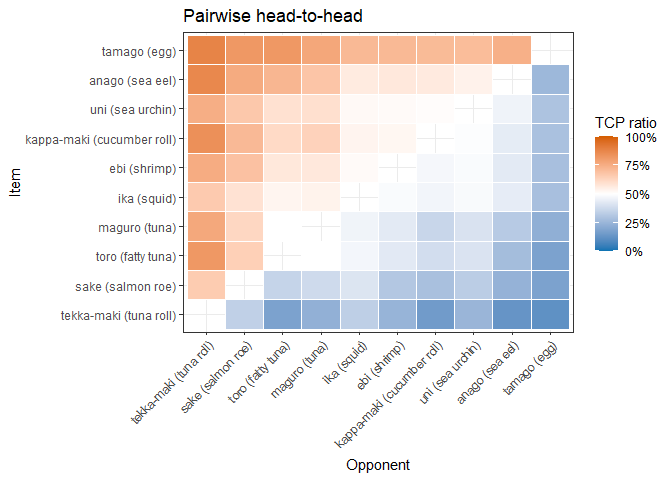
Used when you want to compare preference distributions across many sets of preferences simultaneously. Each point is one set of preference (e.g. an electoral division, a customer survey, etc.), and its position inside the simplex reflects how support is split among the items.
# First-preference shares across 2025 Australian Federal Election divisions
tern22_df <- aecdop22_transformed |>
  filter(CountNumber == 0)
head(tern22_df)
#> # A tibble: 6 × 6
#>   DivisionNm CountNumber ElectedParty   ALP   LNP Other
#>   <chr>            <dbl> <chr>        <dbl> <dbl> <dbl>
#> 1 Adelaide             0 ALP          0.400 0.32  0.280
#> 2 Aston                0 LNP          0.325 0.430 0.244
#> 3 Ballarat             0 ALP          0.447 0.271 0.282
#> 4 Banks                0 LNP          0.353 0.452 0.195
#> 5 Barker               0 LNP          0.209 0.556 0.235
#> 6 Barton               0 ALP          0.504 0.262 0.234

# Create ternable object
tern22 <- as_ternable(tern22_df, ALP:Other)

# Plot
ggplot(get_tern_data2d(tern22), aes(x = x1, y = x2)) +
  add_ternary_base() +
  geom_ternary_region(
    vertex_labels = tern22$vertex_labels,
    aes(fill = after_stat(vertex_labels)),
    alpha = 0.3, color = "grey50", show.legend = FALSE
  ) +
  geom_point(aes(color = ElectedParty), alpha = 0.7) +
  add_vertex_labels(tern22$simplex_vertices) +
  scale_fill_manual(
    values = c("ALP" = "#E13940", "LNP" = "#1C4F9C","Other" = "#95A5A6"),
    aesthetics = c("fill", "colour")
  ) +
  labs(title = "First preference in 2022 Australian Federal election")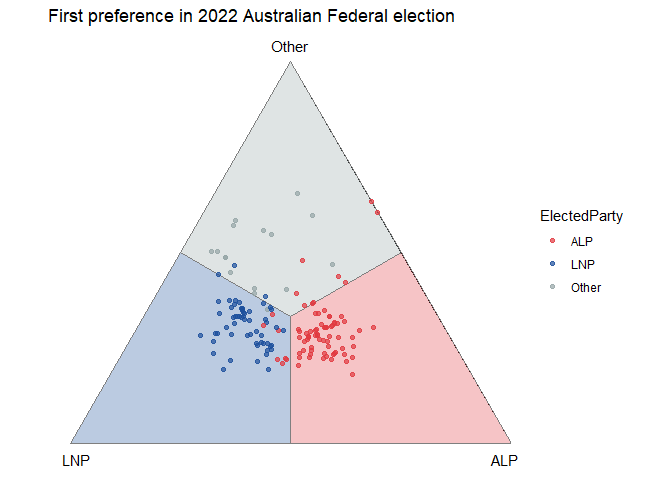
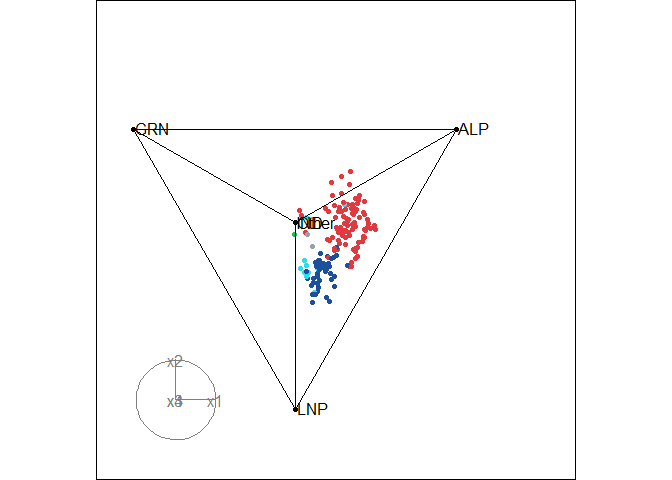
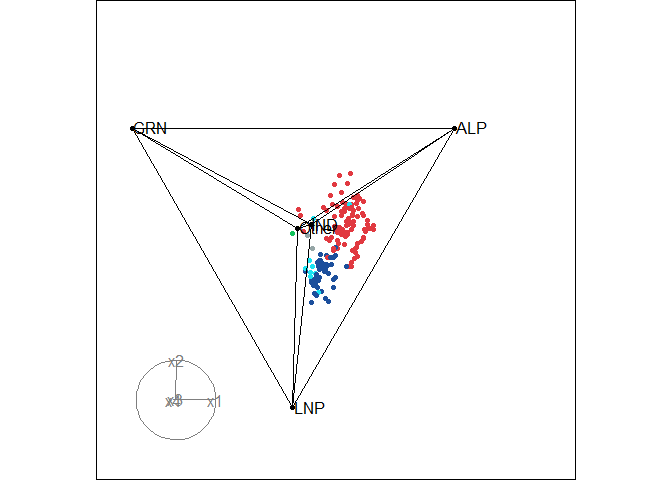
When there are more than 3 alternatives, use
get_tern_datahd() and get_tern_edges() to
prepare the data for an animated tour through the high-dimensional
simplex via the tourr package.
# Load the data
aecdop25_transformed <- prefviz::aecdop25_transformed |>
  filter(CountNumber == 0)
head(aecdop25_transformed)
#> # A tibble: 6 × 8
#>   DivisionNm CountNumber ElectedParty   ALP    GRN   LNP Other    IND
#>   <chr>            <dbl> <chr>        <dbl>  <dbl> <dbl> <dbl>  <dbl>
#> 1 Adelaide             0 ALP          0.465 0.190  0.242 0.104 0
#> 2 Aston                0 ALP          0.373 0      0.377 0.209 0.0414
#> 3 Ballarat             0 ALP          0.424 0      0.286 0.262 0.0281
#> 4 Banks                0 ALP          0.364 0.119  0.391 0.106 0.0202
#> 5 Barker               0 LNP          0.225 0.0816 0.5   0.135 0.0586
#> 6 Barton               0 ALP          0.471 0.159  0.242 0.128 0

# Create ternable object
tern25 <- as_ternable(aecdop25_transformed, ALP:IND)

# Plot
party_colors <- c(
  "ALP" = "#E13940", # Red
  "LNP" = "#1C4F9C", # Blue
  "GRN" = "#10C25B", # Green
  "IND" = "#1ce5f3", # Teal
  "Other" = "#95A5A6" # Grey
)

tourr_data <- get_tern_datahd(tern25)
color_vector <- c(
  rep("black", 5),
  party_colors[aecdop25_transformed |> filter(CountNumber == 0) |> pull(ElectedParty)]
)

tourr::animate_xy(
  dplyr::select(tourr_data, starts_with("x")),
  edges      = get_tern_edges(tern25),
  obs_labels = tourr_data[["labels"]],
  col        = color_vector,
  axes       = "bottomleft"
)
To learn more about the visualisations, especially ternary plots, see the package vignettes:
vignette("transform_raw_data", package = "prefviz") -
introduction to common preferential data formats and how to use
dop_transform() and dop_irv() to transform raw
data to be ready for visualisationvignette("draw_ternary_plot", package = "prefviz") -
step-by-step guide to building 2D and high-dimensional ternary plots
with as_ternable(), get_tern_*(), and
tourr.vignette("add_ordered_path", package = "prefviz") - how
to add ordered paths to your ternary plots to trace how preference
distributions evolve over time or across preference setsCook D., Laa, U. (2024) Interactively exploring high-dimensional data and models in R, https://dicook.github.io/mulgar_book/, accessed on 2025/12/20.
These binaries (installable software) and packages are in development.
They may not be fully stable and should be used with caution. We make no claims about them.
Health stats visible at Monitor.