
The hardware and bandwidth for this mirror is donated by dogado GmbH, the Webhosting and Full Service-Cloud Provider. Check out our Wordpress Tutorial.
If you wish to report a bug, or if you are interested in having us mirror your free-software or open-source project, please feel free to contact us at mirror[@]dogado.de.



kuzuR provides an R interface to the Kuzu Graph Database, a
high-performance, embedded graph database. The package acts as a wrapper
around the official Python kuzu client, using the
reticulate package to bridge the two languages. This allows
you to interact with Kuzu seamlessly within your R environment,
integrating its powerful graph computation capabilities into your
existing data analysis workflows.
The primary goal of kuzuR is to provide an idiomatic R
experience for: - Creating and managing Kuzu database instances. -
Executing Cypher queries. - Loading data from and retrieving results
into R data frames and tibbles. - Converting graph query results
directly into R-native graph objects like igraph and
tidygraph.
kuzuR requires a working Python installation with the
kuzu, pandas, and networkx
packages.
You can install the development version from GitHub:
# install.packages("pak")
pak::pak("WickM/kuzuR")
Or the stable version from CRAN:
# install.packages("kuzuR")After installing kuzuR, you must install the required
Python packages. You can do this from your R console using
reticulate:
library(kuzuR)
reticulate::py_install(c("kuzu", "pandas", "networkx"), pip = TRUE)You can check that all dependencies are correctly installed by running:
check_kuzu_installation()
#> The 'kuzu', 'pandas', and 'networkx' Python packages are installed and available.Here is a complete example demonstrating how to create a database, define a schema, load data, and run queries.
library(kuzuR)
library(igraph)
library(tidygraph)

# 1. Create a database in a temporary directory
db_path <- tempfile()
con <- kuzu_connection(db_path)

# 2. Define a schema
# Create a 'Person' node table with a STRING name and INT64 age
schema_query_1 <- "CREATE NODE TABLE Person (
  name STRING,
  age INT64,
  PRIMARY KEY (name)
)"
kuzu_execute(con, schema_query_1)
#> <kuzu.query_result.QueryResult object at 0x000001DDFFE00050>

# Create a 'Knows' relationship table
schema_query_2 <- "CREATE REL TABLE Knows(FROM Person TO Person, since INT64)"
kuzu_execute(con, schema_query_2)
#> <kuzu.query_result.QueryResult object at 0x000001DDFFC97D90>

# 3. Load data from R data frames
# Create node data
nodes <- data.frame(
  name = c("Alice", "Bob", "Carol"),
  age = c(30, 40, 50)
)

# Create edge data
edges <- data.frame(
  from_person = c("Alice", "Bob"),
  to_person = c("Bob", "Carol"),
  since = c(2010, 2015)
)

# Use kuzu_copy_from_df to load the data
kuzu_copy_from_df(con, nodes, "Person")

names(edges) <- c("FROM", "TO", "since")
kuzu_copy_from_df(con, edges, "Knows")

# 4. Execute Cypher queries
# Retrieve data as a data frame
query_result <- kuzu_execute(con, "MATCH (p:Person) RETURN p.name, p.age")
as.data.frame(query_result)
#>   p.name p.age
#> 1  Alice    30
#> 2    Bob    40
#> 3  Carol    50

# 5. Convert graph results to R objects
# The same query result can be converted into different graph formats.
graph_result <- kuzu_execute(con, "MATCH (a:Person)-[k:Knows]->(b:Person) RETURN a, k, b")

# a) Convert to an igraph object
g_igraph <- as_igraph(graph_result)
print(g_igraph)
#> IGRAPH 6697a05 DN-- 3 2 --
#> + attr: name (v/c), age (v/n), Person (v/l), label (v/c), _label (e/c),
#> | _id (e/x), _dst (e/x), since (e/n), _src (e/x)
#> + edges from 6697a05 (vertex names):
#> [1] Person_Alice->Person_Bob   Person_Bob  ->Person_Carol
plot(g_igraph)

# b) Convert to a tidygraph object
g_tidy <- as_tidygraph(graph_result)
print(g_tidy)
#> # A tbl_graph: 3 nodes and 2 edges
#> #
#> # A rooted tree
#> #
#> # Node Data: 3 × 4 (active)
#>   name           age Person label
#>   <chr>        <dbl> <lgl>  <chr>
#> 1 Person_Alice    30 TRUE   Person
#> 2 Person_Bob      40 TRUE   Person
#> 3 Person_Carol    50 TRUE   Person
#> #
#> # Edge Data: 2 × 7
#>    from    to `_label` `_id`            `_dst`           since `_src`
#>   <int> <int> <chr>    <list>           <list>           <dbl> <list>
#> 1     1     2 Knows    <named list [2]> <named list [2]>  2010 <named list [2]>
#> 2     2     3 Knows    <named list [2]> <named list [2]>  2015 <named list [2]>

# 6. Inspecting Query Results
# You can inspect the schema of a query result without converting it to a data frame.
# Get column names
kuzu_get_column_names(query_result)
#> [1] "p.name" "p.age"

# Get column data types
kuzu_get_column_data_types(query_result)
#> [1] "STRING" "INT64"

# Get the full schema as a named list
kuzu_get_schema(query_result)
#> $p.name
#> [1] "STRING"
#>
#> $p.age
#> [1] "INT64"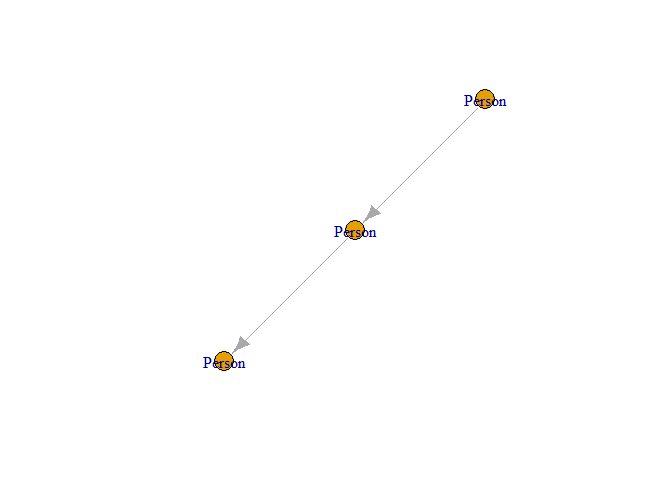
Plot of the graph structure created from Kuzu query results.
These binaries (installable software) and packages are in development.
They may not be fully stable and should be used with caution. We make no claims about them.
Health stats visible at Monitor.