
The hardware and bandwidth for this mirror is donated by dogado GmbH, the Webhosting and Full Service-Cloud Provider. Check out our Wordpress Tutorial.
If you wish to report a bug, or if you are interested in having us mirror your free-software or open-source project, please feel free to contact us at mirror[@]dogado.de.

fixes is an R package for
difference-in-differences estimation in panel data. It
covers the three stages of a modern DiD workflow:
| Stage | Function | What it does |
|---|---|---|
| 1. Event study | run_es() |
Dynamic treatment effects by relative time (6 estimators) |
| 2. ATT aggregation | calc_att() |
Aggregated ATT — overall, by cohort, by calendar time |
| 3. Basic DiD | run_did() |
Single-coefficient TWFE DiD with modelsummary
support |
| 4. Sensitivity | honest_sensitivity() |
Robust inference under violations of parallel trends (Rambachan & Roth 2023) |
| Visualisation | plot_es() |
Static ggplot2 event study plot |
| Visualisation | plot_att_gt() |
ATT(g,t) heatmap / facet plot (CS estimator) |
| Visualisation | plot_es_interactive() |
Interactive plotly plot with hover tooltips |
| Visualisation | plot_honest() |
Sensitivity plot of robust CIs vs. restriction size |
Estimators (selected via the estimator
argument in run_es() and calc_att()):
estimator |
Reference | Best for |
|---|---|---|
"twfe" |
Classic TWFE | Universal treatment timing |
"cs" |
Callaway & Sant’Anna (2021) | Staggered adoption |
"sa" |
Sun & Abraham (2021) | Staggered adoption |
"bjs" |
Borusyak, Jaravel & Spiess (2024) | Staggered adoption |
"twm" |
Wooldridge (2025) | Staggered adoption; optional cohort trends |
"flex" |
Deb, Norton, Wooldridge & Zabel (2024) | Repeated cross-section data |
# From CRAN
install.packages("fixes")

# Development version
pak::pak("yo5uke/fixes")library(fixes)run_did()For a simple two-way FE DiD with a single treatment coefficient, use
run_did(). Output is fully compatible with
modelsummary::modelsummary() and
tinytable::tt().
There are two equivalent ways to specify the treatment:
# Option A: supply a pre-built D_it indicator
df$D <- as.integer(df$treated & df$year >= 2006)
res <- run_did(df, outcome = y, treatment = D, fe = ~ id + year)
# Option B: let run_did() construct D_it from group indicator + timing
res <- run_did(df, outcome = y, treatment = treated,
time = year, timing = 2006,
fe = ~ id + year)Both options produce a did_result object:
df <- fixest::base_did

# Build a universal-timing DiD dataset
df$D <- as.integer(df$treat == 1 & df$period >= 5)

res <- run_did(
  data    = df,
  outcome = y,
  treatment = D,
  fe      = ~ id + period,
  cluster = ~ id
)

print(res)
## DiD Estimation [TWFE]
## N = 1080 obs | 330 treated obs
## FE: id + period
## VCOV: cluster | Cluster: id
##
## term estimate std.error statistic p.value
## 1 D 4.5 0.544 8.27 3.94e-13run_did() integrates with the broom and
modelsummary ecosystems:
broom::tidy(res)          # all coefficients (treatment + any covariates)
broom::glance(res)        # nobs, within R², AIC, ...
modelsummary::modelsummary(res) # regression table via tinytablerun_es()All six estimators share the same interface.
Use run_es() with a fixed event date. Here we use
fixest::base_did, a balanced panel where all units are
treated at period 5.
es <- run_es(
  data      = df,
  outcome   = y,
  treatment = treat,
  time      = period,
  timing    = 5,
  fe        = ~ id + period,
  cluster   = ~ id,
  baseline  = -1
)

print(es)
## Event Study Result (fixes)
## N: 1080 | Units: NA | Treated units: 1080 | Never-treated: NA
## FE: id + period
## VCOV: cluster | Cluster: id
## Method: classic | lead_range: 4 lag_range: 5 baseline: -1plot_es(es)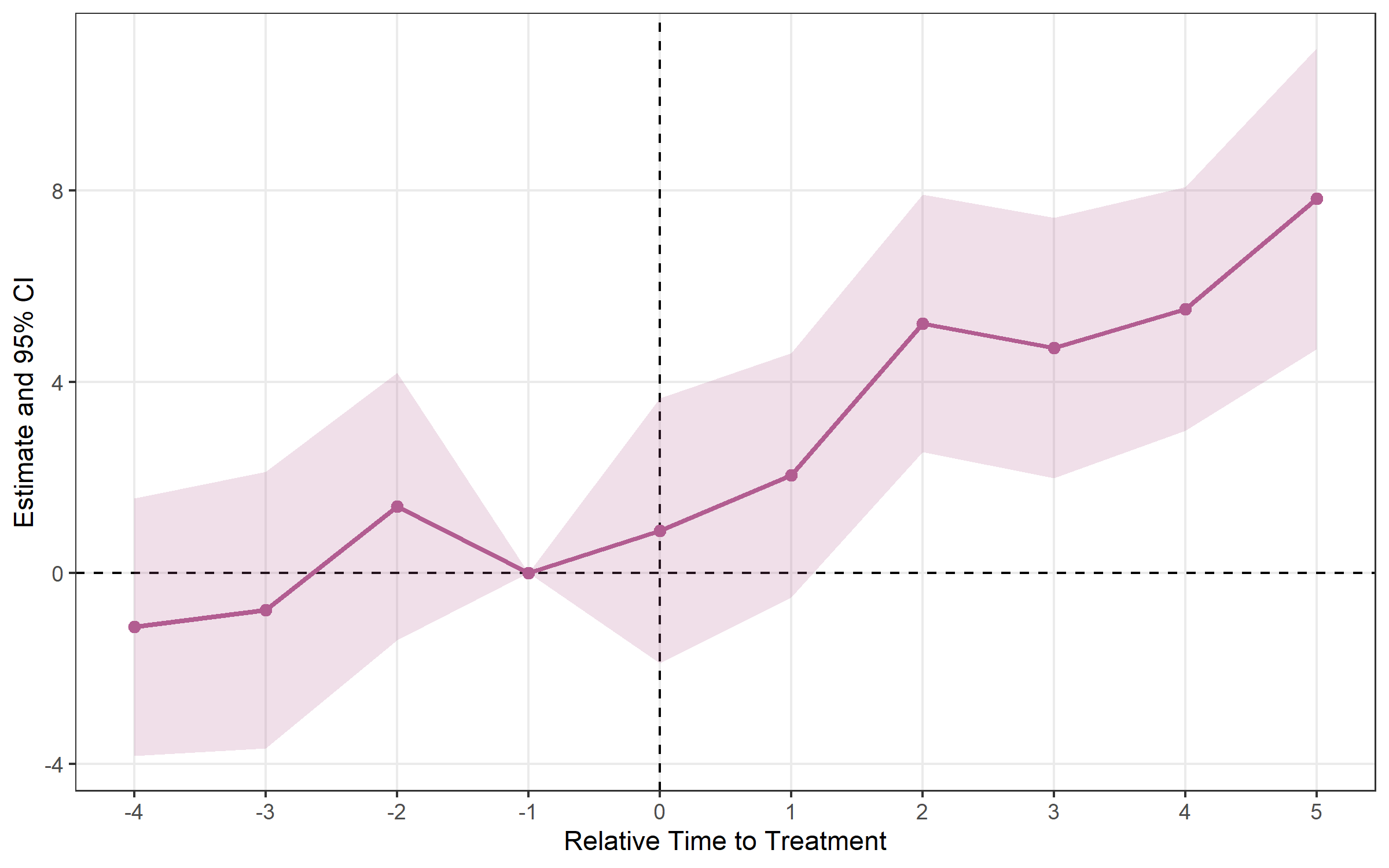
When units adopt treatment at different times, the classic TWFE
estimator can be biased. fixes provides modern
alternatives.
Setup: fixest::base_stagg —
never-treated units have NA timing.
df_stagg <- fixest::base_stagg
df_stagg$timing <- df_stagg$year_treated
df_stagg$timing[df_stagg$year_treated == 10000] <- NAestimator = "cs"cs <- run_es(
data = df_stagg,
outcome = y,
time = year,
timing = timing,
unit = id,
staggered = TRUE,
estimator = "cs",
control_group = "nevertreated"
)
print(cs)## Event Study Result (fixes)
## N: 950 | Units: 95 | Treated units: 45 | Never-treated: 50
## FE:
## VCOV: analytic | Cluster: -
## Method: classic | lead_range: 9 lag_range: 8 baseline: -1plot_es(cs)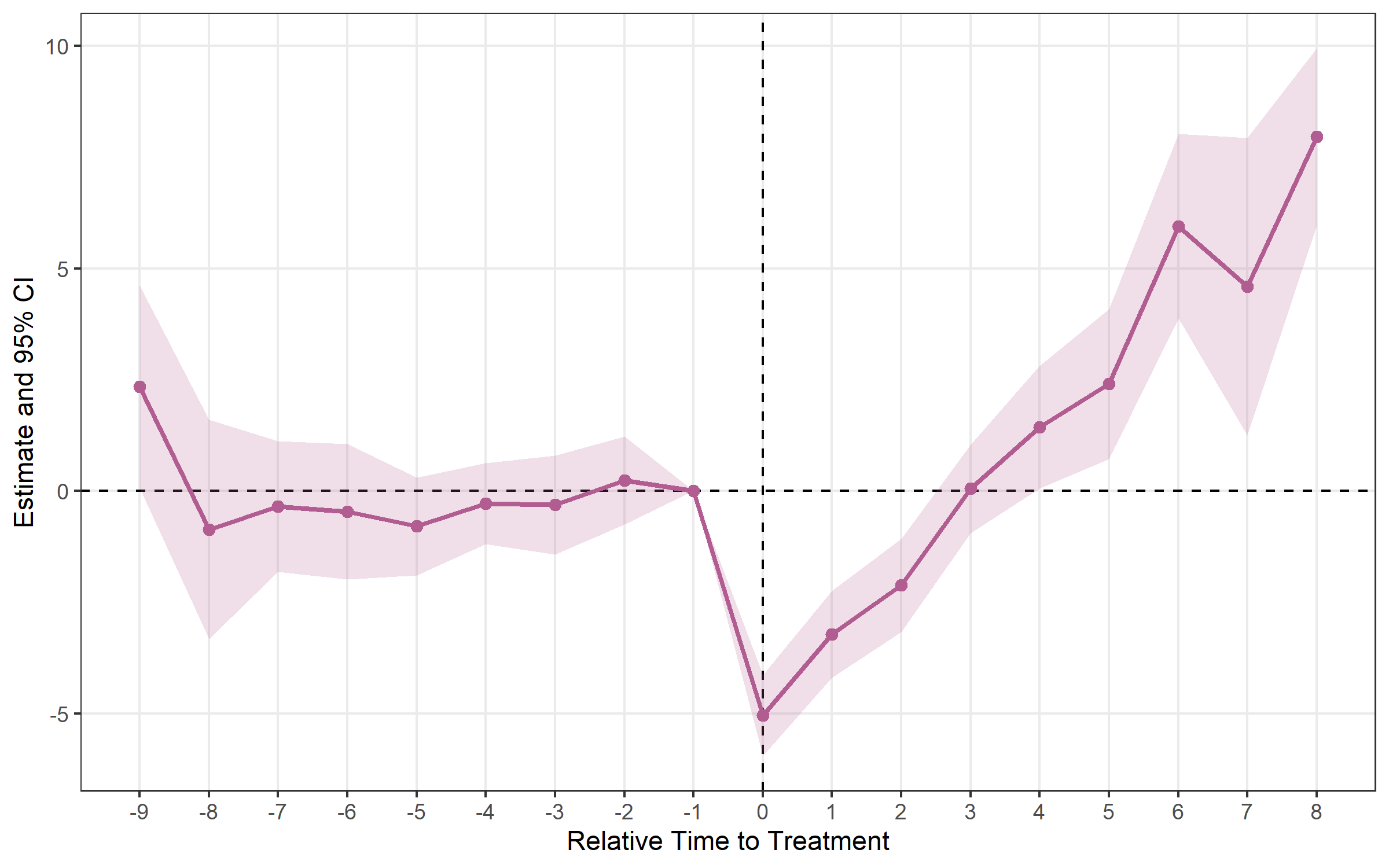
plot_att_gt(cs, type = "heatmap")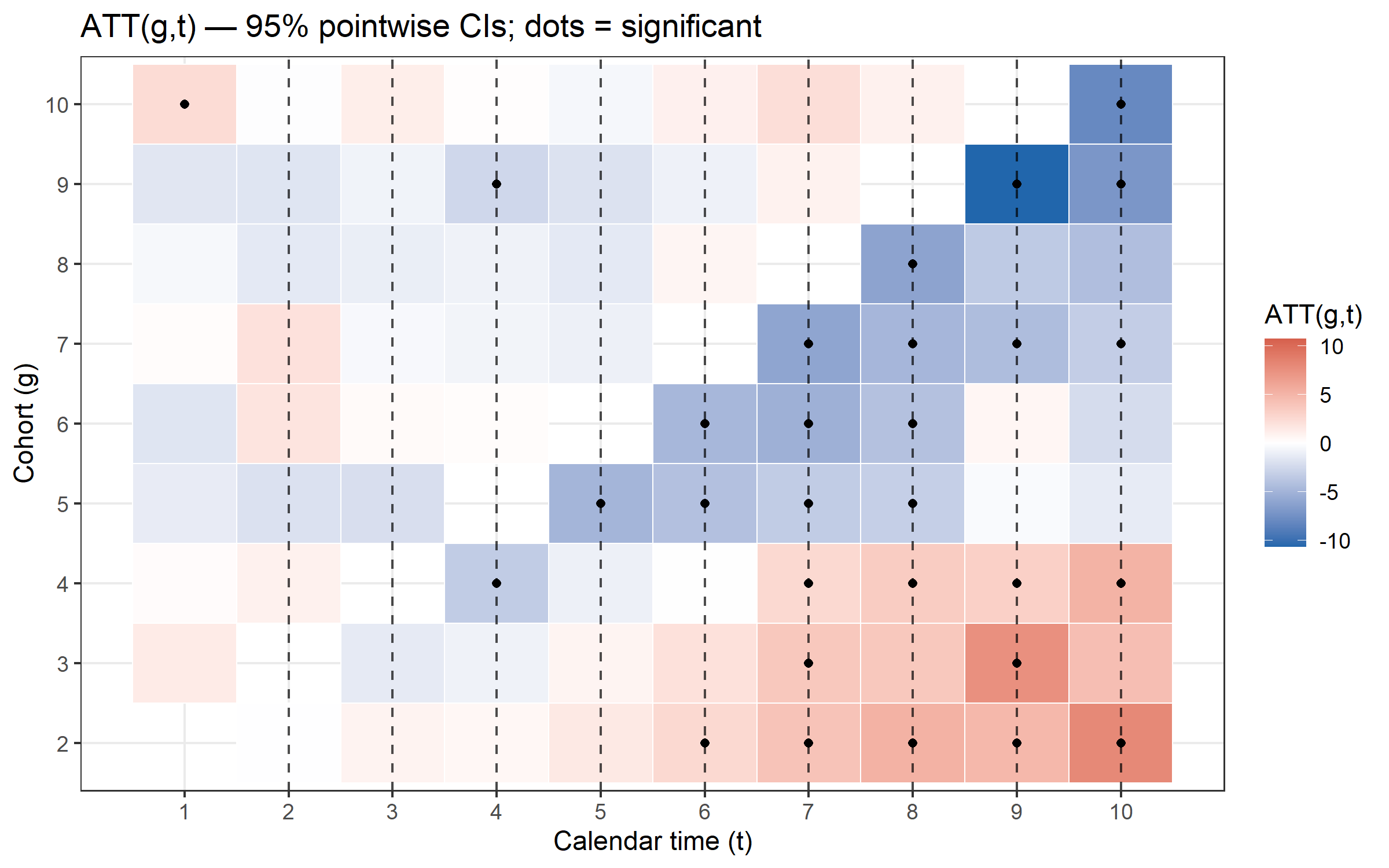
plot_att_gt(cs, type = "facet")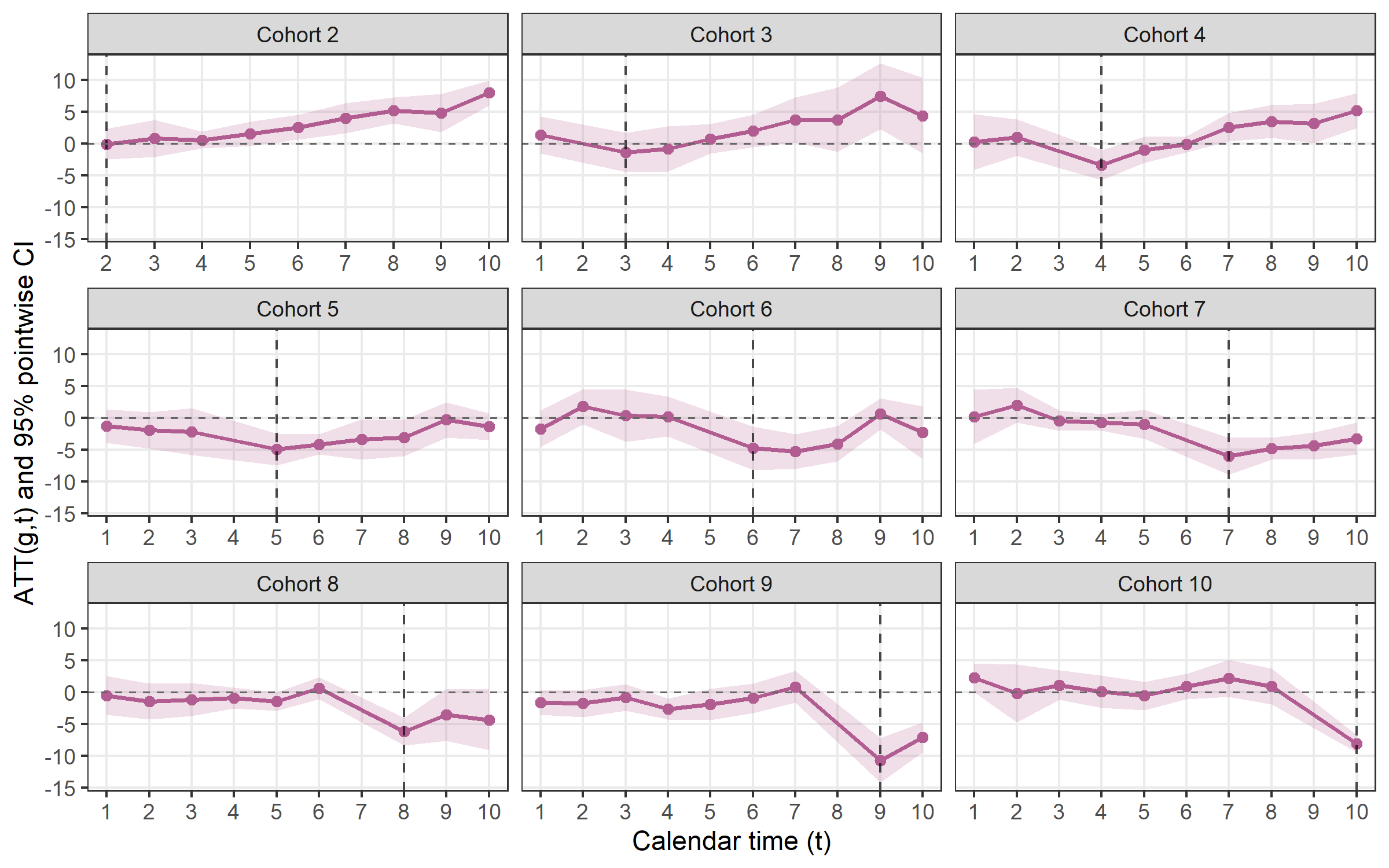
estimator = "sa"sa <- run_es(
data = df_stagg,
outcome = y,
treatment = treated,
time = year,
timing = timing,
unit = id,
fe = ~ id + year,
staggered = TRUE,
estimator = "sa",
cluster = ~ id
)
print(sa)## Event Study Result (fixes)
## N: 950 | Units: 95 | Treated units: 45 | Never-treated: 50
## FE: id + year
## VCOV: HC1 | Cluster: id
## Method: classic | lead_range: 9 lag_range: 8 baseline: -1plot_es(sa)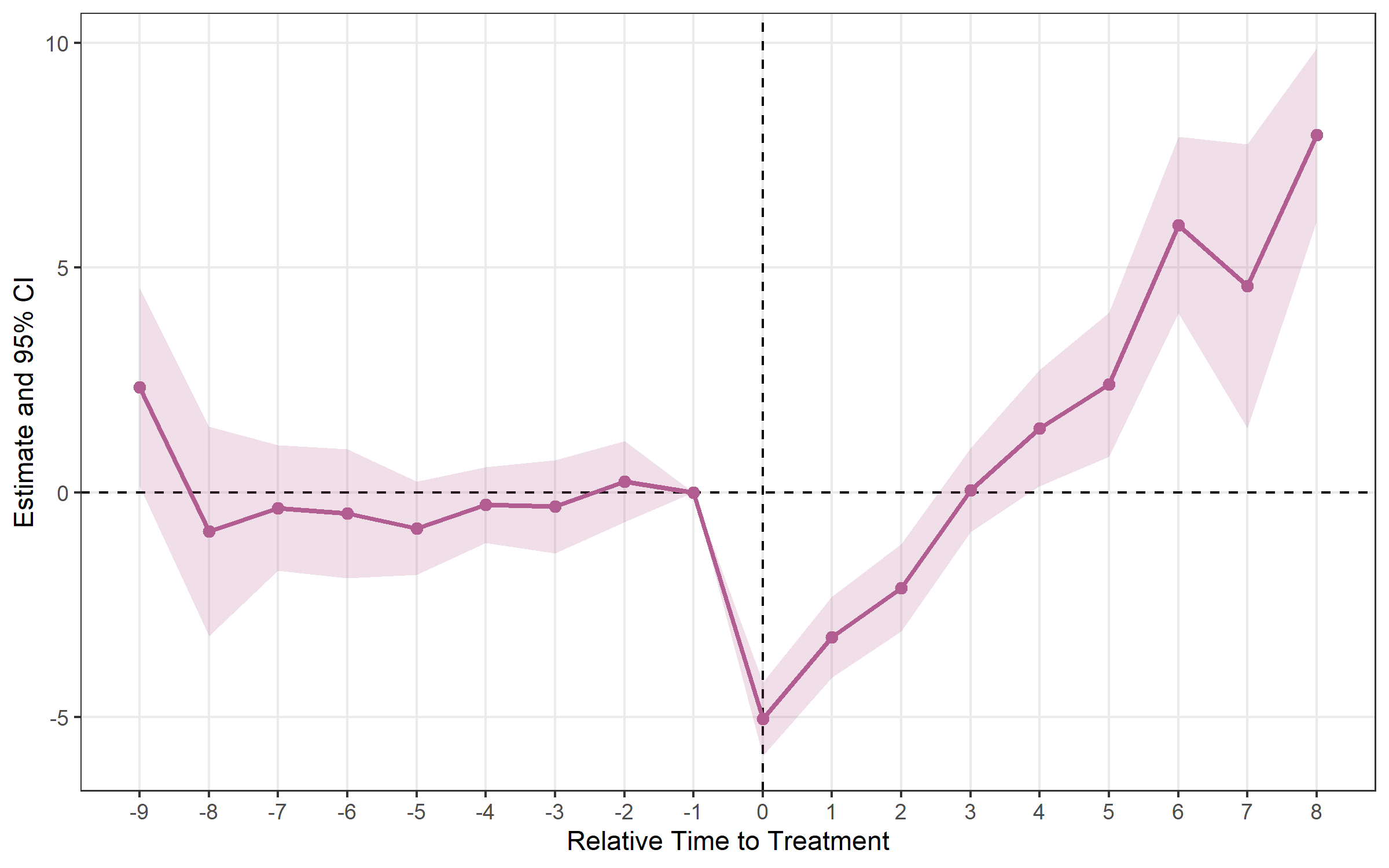
estimator = "bjs"bjs <- run_es(
data = df_stagg,
outcome = y,
time = year,
timing = timing,
unit = id,
staggered = TRUE,
estimator = "bjs"
)
print(bjs)## Event Study Result (fixes)
## N: 950 | Units: 95 | Treated units: 45 | Never-treated: 50
## FE: id + year
## VCOV: bjs_conservative | Cluster: -
## Method: classic | lead_range: 1 lag_range: 8 baseline: -1plot_es(bjs)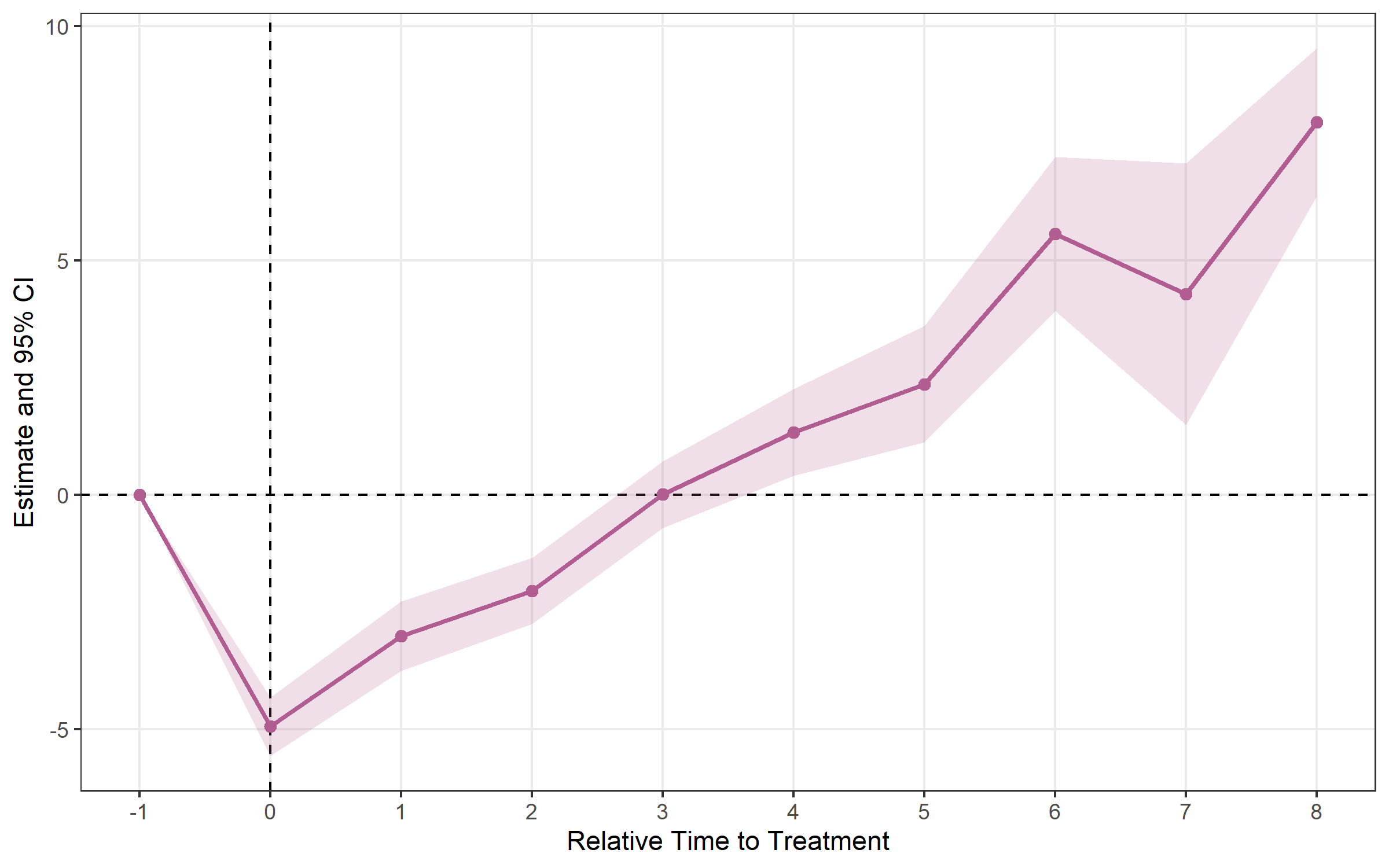
estimator = "twm"Algebraically equivalent to Sun-Abraham in the base case.
trends = TRUE adds cohort-specific linear trend regressors
to absorb differential pre-trends (output shows
relative_time ≥ 0 only).
twm <- run_es(
  data      = df_stagg,
  outcome   = y,
  time      = year,
  timing    = timing,
  unit      = id,
  fe        = ~ id + year,
  staggered = TRUE,
  estimator = "twm"
)

print(twm)
## Event Study Result (fixes)
## N: 950 | Units: 95 | Treated units: 45 | Never-treated: 50
## FE: id + year
## VCOV: HC1 | Cluster: -
## Method: classic | lead_range: 9 lag_range: 8 baseline: -1plot_es(twm)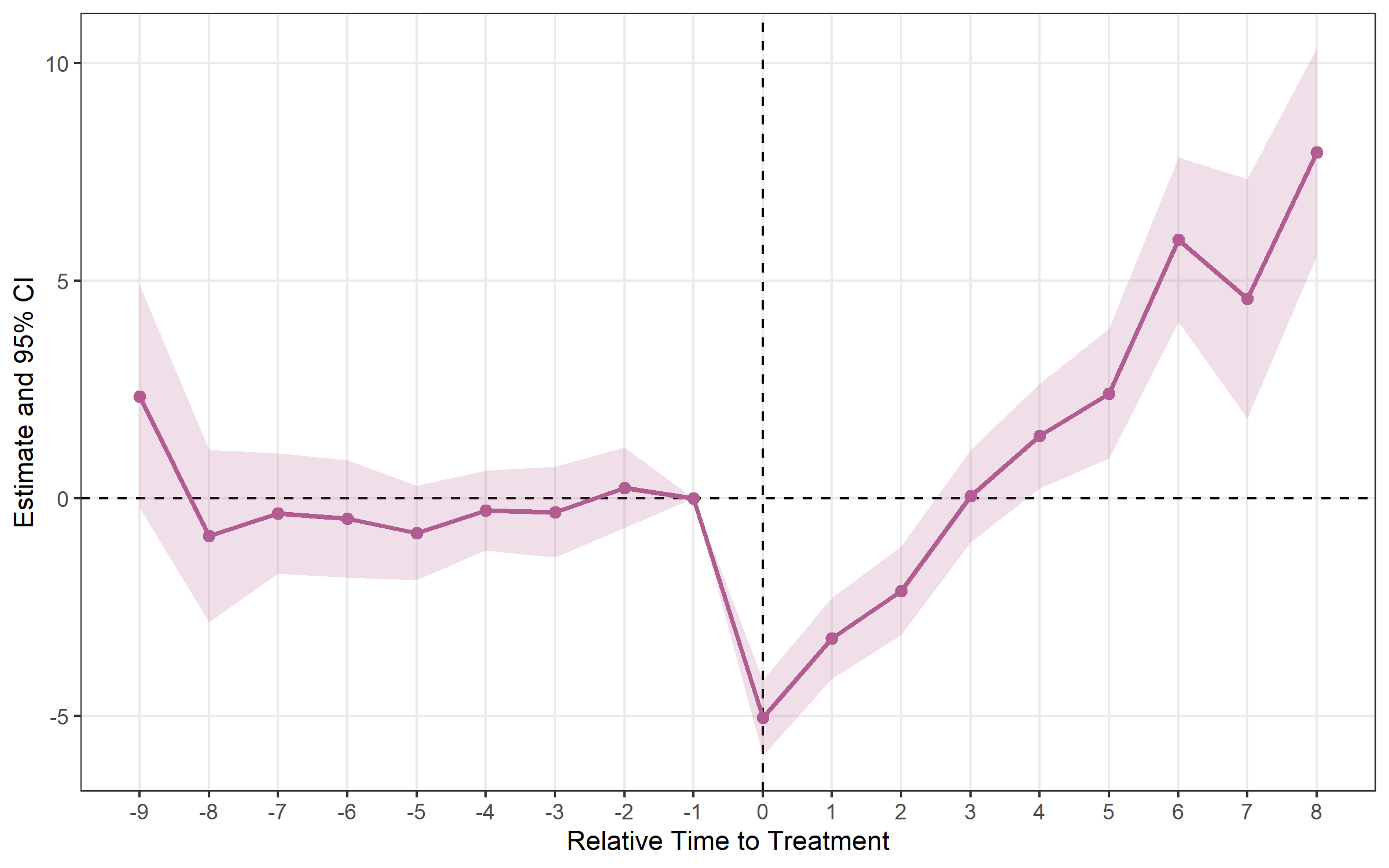
estimator = "flex"Designed for repeated cross-section data (different
individuals each period). Requires a group argument
identifying the treatment group each observation belongs to.
flex <- run_es(
  data      = df_rcs,
  outcome   = y,
  time      = year,
  timing    = timing,
  group     = group_id,
  staggered = TRUE,
  estimator = "flex"
)

plot_es(flex)calc_att()After estimating run_es() with a staggered estimator,
calc_att() computes a single aggregated ATT — or one per
cohort / per calendar period.
# Overall ATT
att_simple <- calc_att(
  data        = df_stagg,
  outcome     = y,
  time        = year,
  timing      = timing,
  unit        = id,
  estimator   = "cs",
  aggregation = "simple"
)

print(att_simple)
## ATT Estimation [estimator: CS | aggregation: Simple (overall)]
## N = 950 obs | 95 units | 45 treated
##
## group estimate std.error statistic p.value conf_low_95 conf_high_95
## 1 NA -0.755 0.226 -3.35 0.000813 -1.2 -0.313# Per-cohort ATT
calc_att(df_stagg, y, year, timing, unit = id,
estimator = "cs", aggregation = "by_cohort")
# Per-calendar-period ATT
calc_att(df_stagg, y, year, timing, unit = id,
estimator = "cs", aggregation = "by_time")Supported estimators for calc_att(): "cs"
(Callaway-Sant’Anna 2021) and "bjs" (Borusyak et
al. 2024).
Pointwise CIs control error rates one period at a time. When you plot 15 pre- and post-treatment estimates, the joint false-positive rate may exceed 5 %. Simultaneous bands (Callaway & Sant’Anna 2021, Corollary 1) provide joint coverage across the entire event-study curve.
cs_boot <- run_es(
  data          = df_stagg,
  outcome       = y,
  time          = year,
  timing        = timing,
  unit          = id,
  staggered     = TRUE,
  estimator     = "cs",
  control_group = "nevertreated",
  bootstrap     = TRUE,
  B             = 999,
  boot_seed     = 42
)
# Lighter outer band = simultaneous CI; darker inner band = pointwise CI
plot_es(cs_boot, show_simultaneous = TRUE)plot_es_interactive(cs_boot, show_simultaneous = TRUE)honest_sensitivity()Event-study estimates rely on the parallel trends
assumption. Rather than testing pre-trends and hoping for the best,
honest_sensitivity() implements Rambachan & Roth
(2023): it reports confidence sets for a post-treatment effect under
progressively weaker restrictions on how different post-treatment
violations of parallel trends can be from the pre-trends, plus a
breakdown value — the largest violation at which the effect is
still significant.
res <- run_es(df, outcome = y, treatment = treat, time = year, timing = 6,
              fe = ~ id + year)

# Relative-magnitude restriction: post violation <= Mbar x max pre violation
h <- honest_sensitivity(res, type = "relative_magnitude",
                        Mvec = c(0, 0.5, 1, 1.5, 2))
print(h)          # robust CIs per Mbar + the original (parallel-trends) CI
plot_honest(h)    # "top-down" sensitivity plot
Use type = "smoothness" for the (bounded second
difference) restriction. Inference uses the Andrews-Roth-Pakes
conditional test — a pure-R reimplementation validated against the
HonestDiD package. For estimators other than
"twfe", pass betahat and sigma
directly. The numeric helpers (lpSolveAPI,
Rglpk, TruncatedNormal, Matrix,
pracma) are optional Suggests.
plot_es() works with results from any estimator.
plot_es(es, type = "errorbar")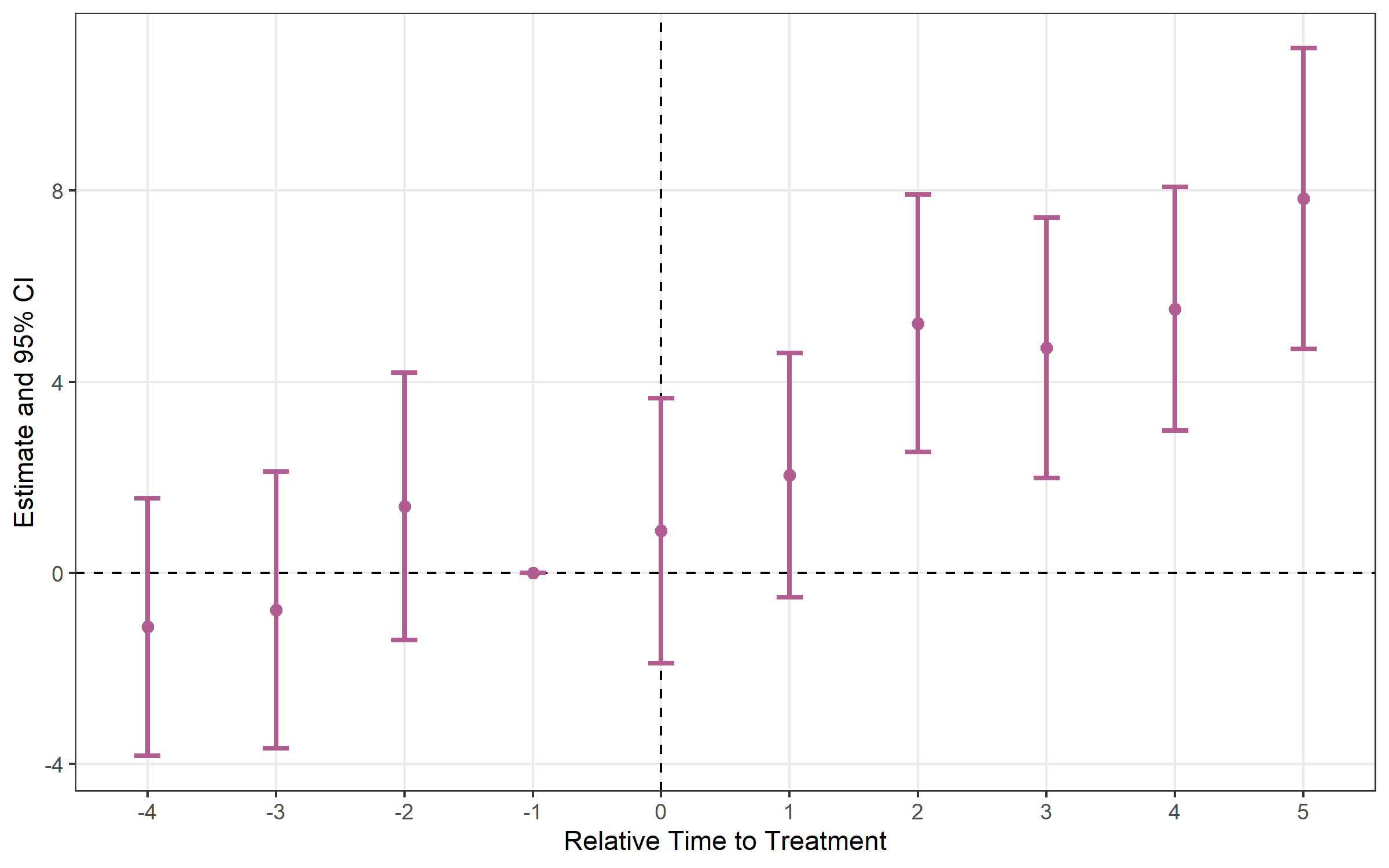
es_multi <- run_es(
  data      = df,
  outcome   = y,
  treatment = treat,
  time      = period,
  timing    = 5,
  fe        = ~ id + period,
  cluster   = ~ id,
  conf.level = c(0.90, 0.95, 0.99)
)
plot_es(es_multi, ci_level = 0.90, theme_style = "minimal")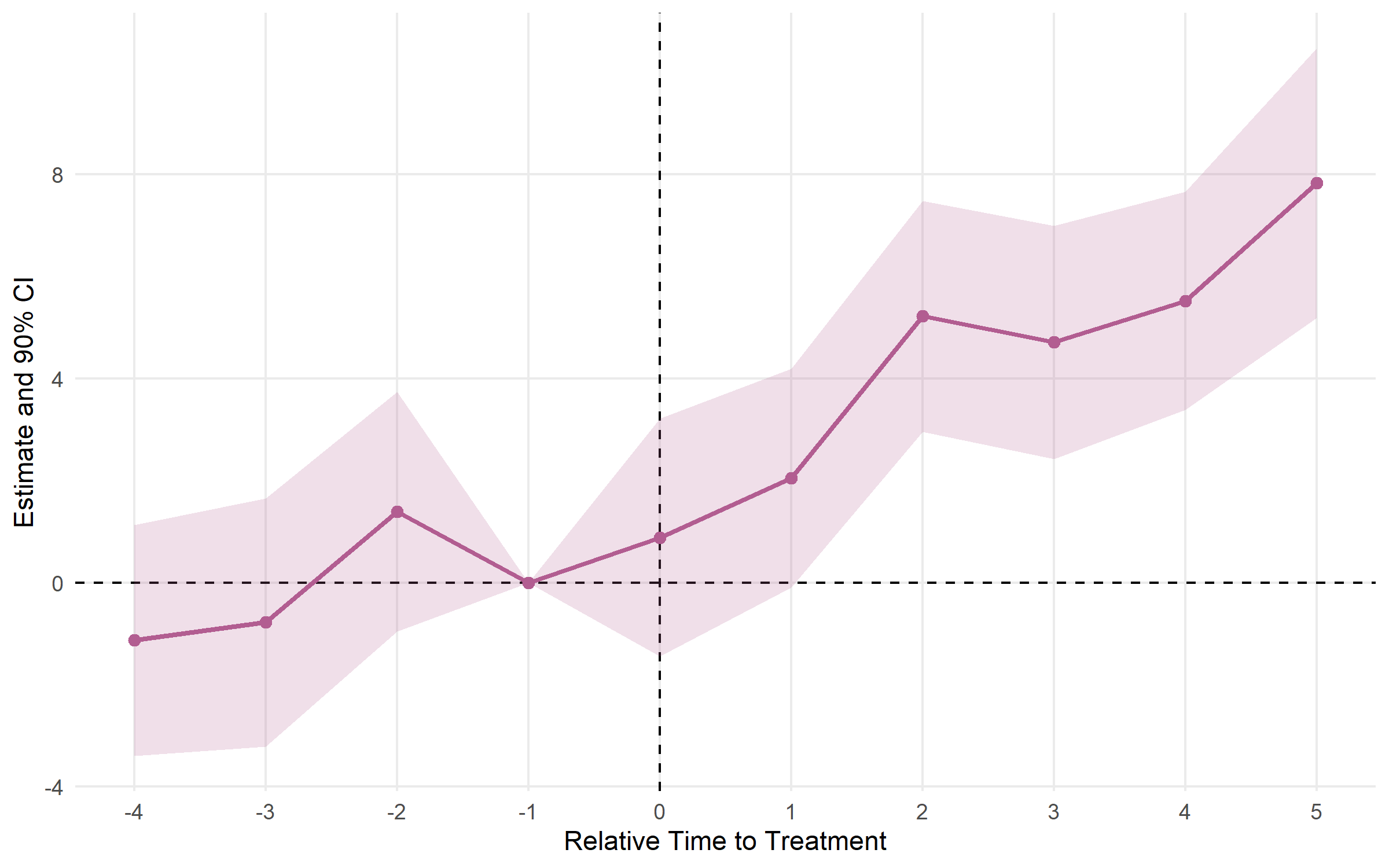
plot_es_interactive(es)run_did()| Argument | Default | Description |
|---|---|---|
data |
— | Data frame (panel) |
outcome |
— | Outcome variable (unquoted; expressions like log(y)
OK) |
treatment |
— | Binary D_it indicator, or group dummy when timing is
set |
timing |
NULL |
Scalar treatment period; auto-constructs
D_it = treatment*(time>=timing) |
fe |
NULL |
FE formula ~ id + year; auto-inferred from
unit + time if omitted |
unit |
NULL |
Unit identifier (for FE inference and sample-size metadata) |
time |
NULL |
Time variable (for FE inference and timing-based D_it
construction) |
covariates |
NULL |
Additional controls, e.g. ~ x1 + x2 |
cluster |
NULL |
Clustering: formula ~ id, column name, or vector |
conf.level |
0.95 |
CI level(s); vector allowed |
vcov |
"HC1" |
VCOV type; cluster-robust SE used automatically when
cluster is set |
run_es()| Argument | Default | Description |
|---|---|---|
data |
— | Data frame (panel or RCS) |
outcome |
— | Outcome variable (unquoted) |
treatment |
NULL |
0/1 treatment dummy ("twfe" only) |
time |
— | Time variable (numeric) |
timing |
— | Treatment date (scalar for "twfe", column for others;
NA = never treated) |
unit |
NULL |
Unit ID (required for "cs", "sa",
"bjs", "twm") |
fe |
NULL |
Fixed effects formula, e.g. ~ id + year |
estimator |
"twfe" |
"twfe", "cs", "sa",
"bjs", "twm", or "flex" |
staggered |
FALSE |
Set TRUE for unit-varying treatment timing |
group |
NULL |
FLEX only: treatment group identifier |
trends |
FALSE |
TWM only: cohort-specific linear trends |
covariates |
NULL |
Controls (supported for "twm" and
"flex") |
control_group |
"nevertreated" |
CS only: "nevertreated" or
"notyettreated" |
cluster |
NULL |
Clustering formula, e.g. ~ id |
baseline |
-1 |
Reference period |
conf.level |
0.95 |
CI level(s); vector allowed |
vcov |
"HC1" |
VCOV type |
bootstrap |
FALSE |
CS only: multiplier bootstrap for simultaneous CIs |
B |
999 |
Bootstrap draws |
boot_seed |
NULL |
Bootstrap RNG seed |
calc_att()| Argument | Default | Description |
|---|---|---|
data |
— | Data frame (panel) |
outcome |
— | Outcome variable (unquoted) |
time |
— | Calendar time variable |
timing |
— | First treatment period per unit; NA = never
treated |
unit |
— | Unit identifier (required) |
estimator |
"cs" |
"cs" or "bjs" |
aggregation |
"simple" |
"simple", "by_cohort", or
"by_time" |
control_group |
"nevertreated" |
CS only |
conf.level |
0.95 |
CI level(s) |
Found a bug or have a feature request? Open an issue on GitHub.
These binaries (installable software) and packages are in development.
They may not be fully stable and should be used with caution. We make no claims about them.
Health stats visible at Monitor.