The hardware and bandwidth for this mirror is donated by dogado GmbH, the Webhosting and Full Service-Cloud Provider. Check out our Wordpress Tutorial.
If you wish to report a bug, or if you are interested in having us mirror your free-software or open-source project, please feel free to contact us at mirror[@]dogado.de.

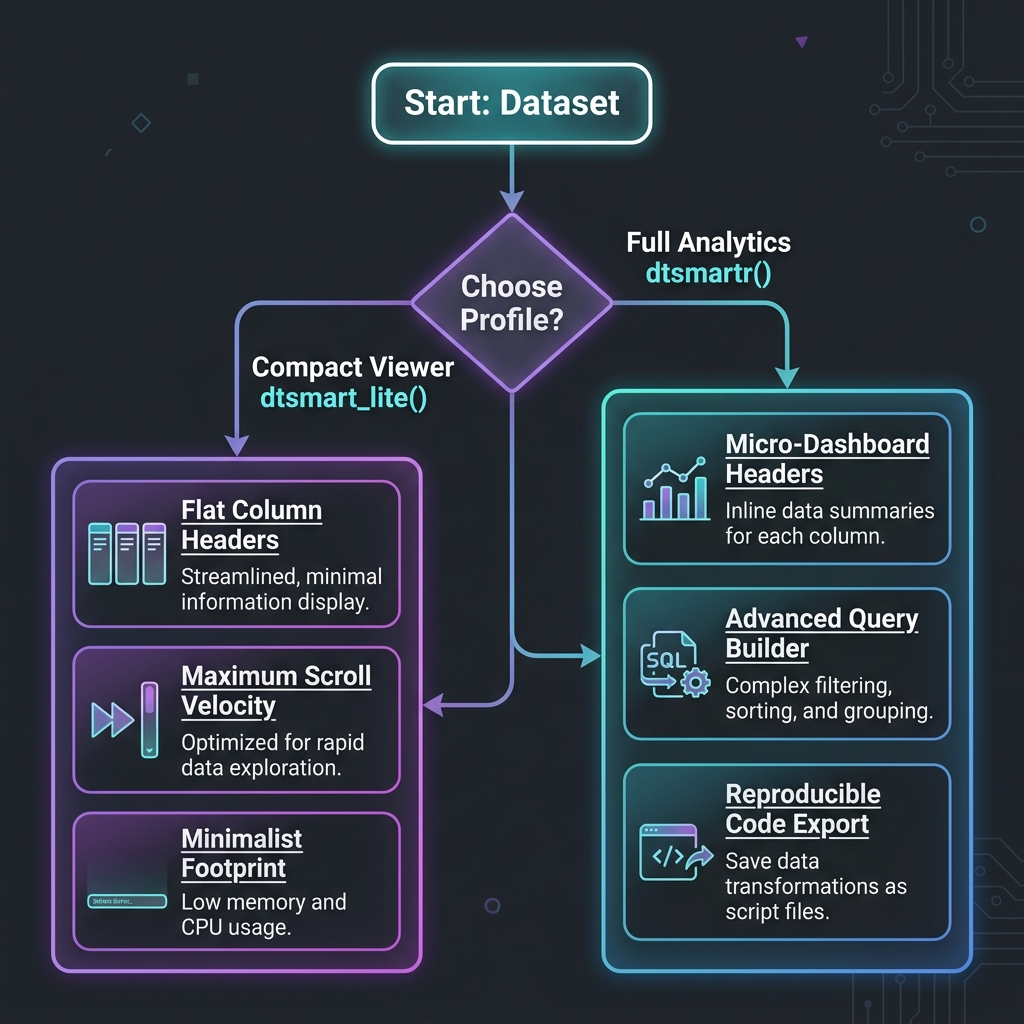
dtsmartr is an interactive, Kaggle-style data
explorer widget for R. Built with modern React and
htmlwidgets, it provides a high-fidelity, ultra-responsive
virtualized grid to browse, sort, filter, and extract insights from
large datasets seamlessly.
It is designed to work beautifully inside the RStudio/Positron Viewer pane, embedded within Shiny applications, rendered in R Markdown/Quarto documents, or exported as standalone, portable HTML files for offline sharing.
Below are actual, unretouched screenshots of dtsmartr in action, showing real dataset rendering and interactive visual metadata elements:
Features mini distribution spark-histograms, type-safe data-type
badges (like # for numeric), and column visibility pickers.

Demonstrates full column labels inline, missingness progress bars
(green/gray under the headers), active categories, and a professional
dark palette perfect for low-light clinical analysis. 
Shows real-time, lag-free scrolling across 83,652 rows and 115
columns of laboratory clinical data
(pharmaverseadam::adlb). Top column headers and left row
indexes remain perfectly sticky. 
Start the interactive ingestion wizard by running
dtsmartr_launch() with no arguments (or using our one-click
launchers). Designed specifically for non-programmers, it provides a
beautiful drag-and-drop file uploader to ingest CSV, Excel
(.xlsx), SAS (.sas7bdat), or RDS files. Once uploaded, users
can inspect, verify, and custom-toggle column types/classes via the
“View” and “Update” panels before feeding the clean dataset directly
into the premium virtualized explorer grid! 
Build complex, multi-rule filters using Match ALL (AND)
or Match ANY (OR) logic. Conditions support =,
is in, contains, <,
> operators with type-specific controls — including a
searchable multi-select checklist dropdown for
categorical columns (e.g. selecting 5 specific lab tests from
LBTEST). The Advanced Filter badge shows
the active filter count at a glance. Real-time row count
(10026 / 83,652 rows) updates instantly as filters are
applied. 
ⓘ)Hovering over the ⓘ info icon next to any column name opens a floating metadata card with key statistics calculated directly from your dataset — no external dependencies required: - Total Rows and Unique Values count - Missing (NA) count with exact percentage - Descriptive Stats for numeric columns: Min, Mean, Median, Max — rendered inline in a clean 2×2 stat grid
This example shows the LBSEQ (Sequence Number) column
across 83,652 rows, with 381 unique
values and only 40 missing (0.0%), with Min =
1, Mean = 142.73, Median = 127, Max = 380. 
Click the Query Code button to instantly generate
copy-pasteable, production-ready R code that perfectly replicates your
current filter and column state: - tidyverse (dplyr):
Produces clean %>% filter() pipeline chains. -
Base R: Generates standard bracket-subset expressions.
- SQL Query: Generates portable ANSI SQL
WHERE clauses.
The generator auto-substitutes your R variable name
(e.g. data) and correctly formats %in% vector
membership checks for multi-value is in conditions. A
Copy button sends the entire block to the clipboard in
one click. 
Click any column’s mini spark-histogram or the Data Insights icon to slide open the Data Insights side panel. For numeric columns, it renders a full-width, interactive SVG distribution histogram featuring: - Column Overview: Data type badge and unique value count - Completeness & Quality: Color-coded valid data / missing (NA) progress bar with exact row counts and percentages - Descriptive Statistics: Min, Max, Mean, Median in a clean 2×2 grid - Distribution Profile: Full-width SVG histogram with hover-to-inspect functionality and Y-axis gridlines
This example shows the AGE column across 83,652 rows:
100% complete, ages ranging from 51 to 89 years, Mean =
74.876, Median = 77. 
For character/categorical columns, the Data Insights drawer renders a horizontal Pareto bar chart showing the distribution of the top categories with their exact value counts and percentages: - Column Overview: Data type badge and unique value count - Completeness & Quality: precise completeness metric (e.g. 99.9% valid / 0.1% missing) - Distribution Profile: Proportional horizontal bars for each category, labeled with exact category name, value count, and percentage
This example shows LBCAT (Lab Test Category) with
5 unique values across 83,598 valid rows: CHEMISTRY
(54.0%), HEMATOLOGY (36.6%), URINALYSIS (8.7%), and OTHER (0.7%). 
Consolas and Fira Code
for numerical scanning) and left-aligns character columns. It
automatically reverses the layout flex-direction for numeric headers to
keep icons and labels beautifully balanced.📌 badge in the row index column, keeping vital subjects or
records in view while scrolling across dozens of variables.NA / null) in elegant, italicized, muted-gray
cells, with customizable placeholder string support
(na_string).“{totalRows} values • {naCount} missing ({naPct}%)”.ⓘ info icon next to any column name to open a detailed
summary tooltip card showing total rows, unique values, and missing
counts, along with:
DataInsightsDrawer side panel.Match ALL (AND) or
Match ANY (OR) connectors.is in and is not in operators render a
searchable checklist panel with helper links (Select All
and Clear) to perform multi-category selection
effortlessly.select(), Base R arguments, SQL lists,
etc.) to project only visible column subsets.adsl or
adlb) for copy-pasteable accuracy.dtsmartr_launch() with data = NULL to start an
interactive file upload wizard powered by datamods. Drag
and drop CSV, Excel, SAS datasets, or RDS files, verify column classes,
and explore them instantly in a full-screen grid interface.dtsmartr() automatically reroutes
rendering in interactive sessions to dtsmartr_launch() in
an external browser, preventing RStudio or Positron IDE viewer pane
freeze-ups. It gracefully warns and renders in-place if called inside a
running Shiny app session.You can install the development version of dtsmartr directly from GitHub:
# Install remotes if not already installed
if (!requireNamespace("remotes", quietly = TRUE)) {
install.packages("remotes")
}
# Install dtsmartr
remotes::install_github("wagh-nikhil/dtsmartr")Open any data frame in your default RStudio or Positron Viewer panel:
library(dtsmartr)
# Explore the classic motor trend car road tests dataset
dtsmartr(mtcars)
# Browse with customized options, themes, and pre-hidden columns
dtsmartr(
data = mtcars,
options = dtsmartr_options(
theme = "dark",
hidden_columns = c("cyl", "hp"),
na_string = "Missing"
)
)dtsmartr extracts R variable label attributes (commonly
used in clinical data like ADaM datasets) and renders them inline inside
the headers.
library(dtsmartr)
library(pharmaverseadam)
# Explore Subject-Level Analysis Dataset (ADSL) with labels and active picker
dtsmartr(
data = adsl,
options = dtsmartr_options(
theme = "auto", # Adapts to IDE or system light/dark settings
show_labels = TRUE, # Displays labels (e.g. "Age", "Race", "Study Identifier")
na_string = "—" # Cleaner missing value indicator
)
)To start the file ingestion wizard or explore massive datasets in an external browser session:
library(dtsmartr)
# 1. Start the zero-code ingestion wizard to drag-and-drop local files (CSV, XLSX, SAS, RDS)
dtsmartr_launch()
# 2. Explore a large dataset directly in your default browser
dtsmartr_launch(pharmaverseadam::adsl)You don’t need to know R to benefit from dtsmartr! The package includes three highly accessible, zero-code launching methods designed specifically for non-programmers, business analysts, or clinical researchers who prefer a simple click-and-run setup:
Once the dtsmartr package is installed, a new launcher
is registered directly in RStudio’s top toolbar: - Click the
Addins dropdown menu in RStudio. - Select
dtsmartr Data Explorer Wizard. - It immediately boots
the Data Ingestion Wizard in your default web browser. No console typing
required!
Launch the wizard directly from your system’s Command Prompt (Windows) or Terminal (macOS/Linux) without launching R manually:
Rscript -e "dtsmartr::dtsmartr_launch()"You can create a standalone Desktop shortcut to run
dtsmartr like a native desktop app: -
Windows: Create a text file named
dtsmartr_explorer.bat on your Desktop with these two lines:
batch @echo off "C:\Program Files\R\R-4.4.3\bin\x64\Rscript.exe" -e "dtsmartr::dtsmartr_launch()"
(If your R version is different, simply replace the path above with
your Rscript.exe location or standard Rscript
if it is in your system PATH). - macOS / Linux:
Create a shell script named dtsmartr_explorer.sh on your
Desktop:
bash #!/bin/bash Rscript -e "dtsmartr::dtsmartr_launch()"
(Make it executable with
chmod +x ~/Desktop/dtsmartr_explorer.sh)
Now, any team member can just double-click the desktop icon to instantly launch the secure local data browser, upload a CSV or Excel spreadsheet, and analyze it with premium aesthetics and visualizations!
save_dtsmartr() exports any dataset as an interactive
HTML grid report. The saved file runs completely offline in any browser
without needing R or an active internet connection.
library(dtsmartr)
# Save mtcars as a fully self-contained portable HTML report
save_dtsmartr(
data = mtcars,
file = "outputs/mtcars_report.html",
options = dtsmartr_options(hidden_columns = "hp"),
open = TRUE
)selfcontained = FALSE)By default, save_dtsmartr() embeds all JavaScript
libraries, CSS assets, and data directly inside the HTML file
(selfcontained = TRUE), which requires Pandoc.
For large datasets (e.g., thousands of rows) or environments without
Pandoc, setting selfcontained = FALSE is highly
recommended. This saves memory and outputs a lightweight HTML
file alongside a companion directory containing the shared JS/CSS
dependencies.
library(dtsmartr)
library(pharmaverseadam)
# Save large ADLB clinical labs dataset without self-contained bloat
save_dtsmartr(
data = adlb,
file = "outputs/adlb_report.html",
selfcontained = FALSE, # Writes JS/CSS to 'outputs/adlb_report_files/'
open = TRUE # Opens resolved HTML in default browser
)| Parameter State | Output Files | Best Used For |
|---|---|---|
selfcontained = TRUE (default) |
A single, portable .html file |
Email attachments and easy folder sharing. |
selfcontained = FALSE |
A lightweight .html file +
<file>_files/ companion directory |
Large datasets (>20k rows), bulk exports, and systems without Pandoc installed. |
[!NOTE]
save_dtsmartr()passesskip_routing = TRUEinternally to the main widget engine. This guarantees that large datasets likeadlb(83k+ rows) are successfully written to disk as widget export files, bypassing the automatic external browser re-routing safeguard.
dtsmartr_options(advanced_filter = TRUE, show_labels = TRUE, column_picker = TRUE, allow_export = TRUE, theme = "auto", na_string = "NA", hidden_columns = NULL)Helper function to customize UI display panels, themes, and default
states. - advanced_filter: Logical. Toggles advanced
logical multi-condition query builder. - show_labels:
Logical. If TRUE, displays column attributes (like label
description) inline in headers. - column_picker: Logical.
Displays column dropdown selector toggle. - allow_export:
Logical. Displays reproducible code query generation button. -
theme: UI appearance theme. Options are
"auto", "light", or "dark". -
na_string: Custom character string representing missing
cells (defaults to "NA"). - hidden_columns:
Character vector of column names to hide by default on initial
render.
dtsmartr(data, width = NULL, height = NULL, elementId = NULL, datasetName = NULL, options = dtsmartr_options(), skip_routing = FALSE)Creates the interactive virtualized htmlwidget grid. -
data: A data.frame to explore. -
width / height: Explicit widget dimensions.
Defaults to full page container (100%). -
elementId: Optional static container ID. -
datasetName: Custom string representing the dataset in
generated reproducible queries. - options: Custom options
list built using dtsmartr_options(). -
skip_routing: Logical. Internal bypass flag used by
save_dtsmartr() to prevent >50k row routing.
dtsmartr_launch(data = NULL, port = NULL, options = dtsmartr_options())Spins up a temporary local background Shiny server to serve the grid
or file upload uploader wizard in your default browser. -
data: A data.frame to explore, or
NULL (default) to start the file uploader wizard. -
port: Optional numeric port. - options: UI
options constructed via dtsmartr_options().
save_dtsmartr(data, file, selfcontained = TRUE, title = "dtsmartr", open = FALSE, background = "white", libdir = NULL, width = NULL, height = NULL, elementId = NULL, options = dtsmartr_options(), verbose = TRUE)Exports a data.frame as a fully interactive, standalone
offline HTML file. - data: A data.frame to
explore. - file: Path to the output HTML file. -
selfcontained: Logical. When TRUE (default),
bundles all resources. When FALSE, creates a companion
directory next to the file. - title: Browser window / tab
title. - open: Logical. Open in default browser immediately
after saving in interactive sessions. - options: Custom
options list built using dtsmartr_options().
The frontend is implemented in React inside
srcjs/dtsmartr.jsx and compiled with Webpack. To compile
frontend changes:
# Navigate into the package directory
cd dtsmartr
# Install NodeJS dependencies
npm install
# Compile React resources into inst/htmlwidgets/dtsmartr.js
npm run buildInside R, re-generate documentation, namespaces, and re-install:
# Generate Rd manuals and NAMESPACE
devtools::document()
# Install the package locally
devtools::install()This package is licensed under the MIT License - see the LICENSE file for details.
These binaries (installable software) and packages are in development.
They may not be fully stable and should be used with caution. We make no claims about them.
Health stats visible at Monitor.