
The hardware and bandwidth for this mirror is donated by dogado GmbH, the Webhosting and Full Service-Cloud Provider. Check out our Wordpress Tutorial.
If you wish to report a bug, or if you are interested in having us mirror your free-software or open-source project, please feel free to contact us at mirror[@]dogado.de.

datasusr provides fast, in-memory reading of DATASUS
.dbc files and a complete workflow for discovering,
downloading, caching, and reading Brazilian public health data from the
DATASUS FTP.
Looking for a broader toolkit? If your workflow goes beyond the DATASUS FTP — e.g. you also need IBGE surveys (VIGITEL, PNS, PNAD-C, POF, Censo), SISAB primary-care indicators, ANS, ANVISA, or out-of-the-box variable dictionaries and value labels —
healthbRis the more complete and currently more active package, and is the recommended first choice in many cases.datasusrfocuses on being a small, fast, dependency-light reader for raw DBC files plus a catalog and FTP layer. See the Comparison article for the full breakdown.
|
❕️ Disclaimer This package is an independent, community-maintained tool that accesses publicly available data files from the DATASUS FTP server ( ftp://ftp.datasus.gov.br). It is not affiliated
with the Brazilian Ministry of Health, DATASUS, or any
government entity. To maintain consistency with R package development
standards, all functions use English names
(e.g. datasus_fetch(), datasus_sources()).
However, because the source data is produced by Brazilian government
systems, parameter values use official DATASUS codes in
Portuguese (e.g. source = “SIHSUS”, uf =
“PE”), and column names in the returned tibbles
reflect the original DBC/DBF field names (e.g. uf_zi,
ano_cmpt, munic_res, val_tot).
For reference on the original data layouts and field descriptions, use
datasus_docs_url() or see the
official DATASUS
documentation.
|
# Install from GitHub
# install.packages("remotes")
remotes::install_github("StrategicProjects/datasusr")library(datasusr)
# One-step: list, download, and read SIH data for Pernambuco
df <- datasus_fetch(
source = "SIHSUS",
file_type = "RD",
year = 2024,
month = 1,
uf = "PE"
)
dfFor more control, use the individual functions:
library(datasusr)

# 1. Explore the catalog
datasus_sources()
datasus_file_types(source = "SIHSUS")

# 2. List available files on the FTP
files <- datasus_list_files(
  source    = "SIHSUS",
  file_type = "RD",
  year      = 2024,
  month     = 1:3,
  uf        = c("PE", "PB")
)

# 3. Download (with automatic caching)
downloads <- datasus_download(files, use_cache = TRUE)

# 4. Read a DBC file into a tibble
x <- read_datasus_dbc(downloads$local_file[[1]])

# 5. Read with column selection and type control
x <- read_datasus_dbc(
  downloads$local_file[[1]],
  select     = c("uf_zi", "ano_cmpt", "dt_inter", "val_tot"),
  col_types  = c(dt_inter = "date", val_tot = "double"),
  parse_dates = TRUE
)Downloads are cached by default so repeated runs do not hit the DATASUS FTP:
datasus_cache_info()
datasus_cache_list()

# Prune old files
datasus_cache_prune(older_than_days = 90)

# Or clear everything
datasus_cache_clear()
You can configure the cache directory via the
DATASUSR_CACHE_DIR environment variable, the
datasusr.cache_dir R option, or the cache_dir
argument.
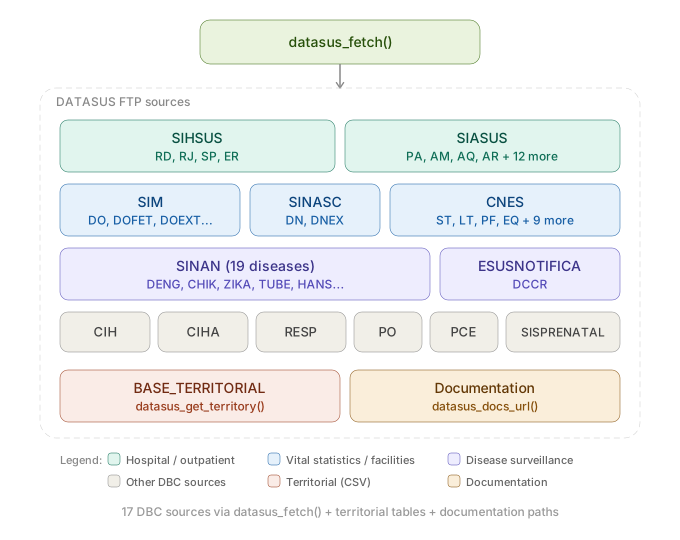
| Function | Purpose |
|---|---|
datasus_fetch() |
List + download + read in one call |
read_datasus_dbc() |
Read .dbc / .dbf files into a tibble |
datasus_sources() |
Browse data sources in the catalog |
datasus_file_types() |
Browse file types by source |
datasus_list_files() |
List candidate files (optionally validated against FTP) |
datasus_download() |
Download files with caching support |
datasus_get_territory() |
Download territorial reference tables (municipalities, etc.) |
datasus_docs_url() |
Find FTP paths for documentation and data dictionaries |
datasus_ftp_ls() |
Raw FTP directory listing |
datasus_cache_*() |
Cache management helpers |
All functions emit cli progress messages by default.
Suppress them with verbose = FALSE.
MIT
These binaries (installable software) and packages are in development.
They may not be fully stable and should be used with caution. We make no claims about them.
Health stats visible at Monitor.