


The hardware and bandwidth for this mirror is donated by dogado GmbH, the Webhosting and Full Service-Cloud Provider. Check out our Wordpress Tutorial.
If you wish to report a bug, or if you are interested in having us mirror your free-software or open-source project, please feel free to contact us at mirror[@]dogado.de.
A docking layout manager provided by dockViewR can be used as front-end to a blockr board using this package.
You can install the development version of blockr.dock from GitHub with:
# install.packages("pak")
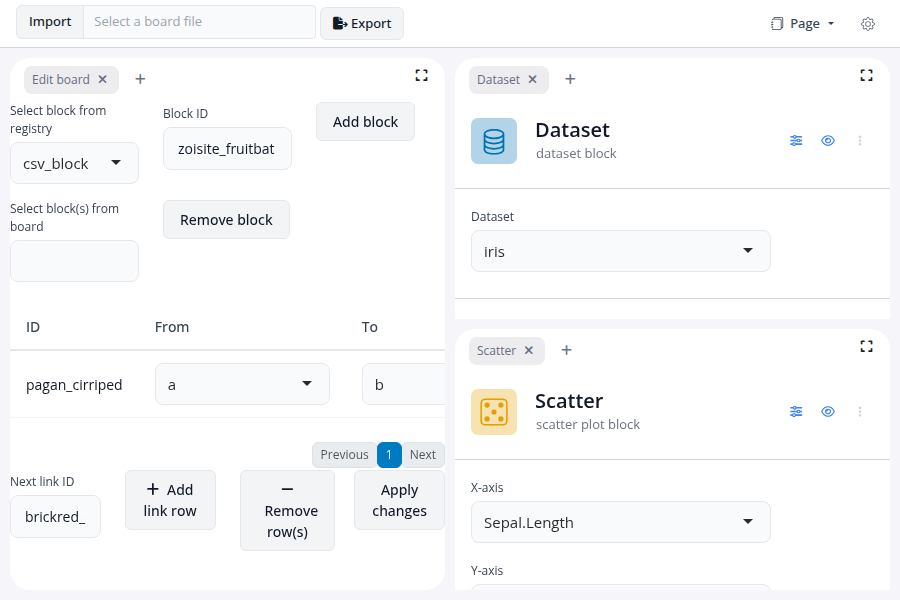
pak::pak("BristolMyersSquibb/blockr.dock")To start up a board for visualizing Sepal.Length against
Sepal.Width for the iris dataset:
library(blockr.dock)
library(blockr.core)

serve(
  new_dock_board(
    blocks = c(
      a = new_dataset_block("iris"),
      b = new_scatter_block(x = "Sepal.Length", y = "Sepal.Width")
    ),
    links = list(from = "a", to = "b", input = "data"),
    extensions = list(edit = new_edit_board_extension()),
    layouts = list("edit", list("a", "b"))
  )
)
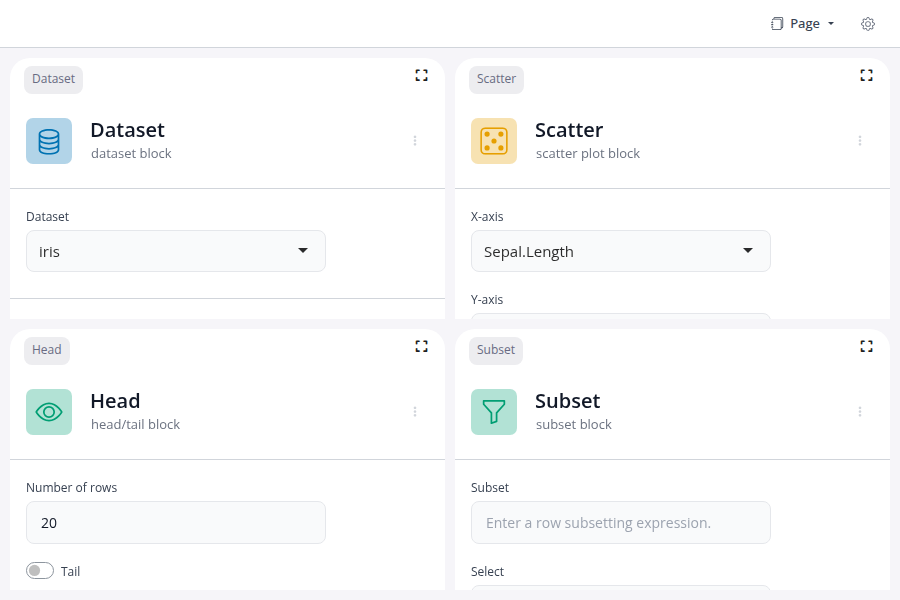
A locked dock prevents users from adding or removing blocks and extensions. Drag-and-drop and panel resizing are also disabled.
library(blockr.dock)
library(blockr.core)

options(blockr.dock_is_locked = TRUE)

serve(
  new_dock_board(
    blocks = c(
      a = new_dataset_block("iris"),
      b = new_head_block(n = 20L),
      c = new_scatter_block(x = "Sepal.Length", y = "Sepal.Width"),
      d = new_subset_block()
    ),
    links = c(
      new_link("a", "b", input = "data"),
      new_link("b", "c", input = "data"),
      new_link("b", "d", input = "data")
    ),
    layouts = list(list("a", "b"), list("c", "d"))
  )
)
Since blockr.dock 0.1.1 every board carries a
dock_layouts object: a list of one or more views, exposed
as a tab dropdown at the top of the app. The single-page case (what
rendered as a no-tab dock in 0.1.0) is now a dock_layouts
with one auto-named "Page" view, which is what you see in
the Simple dock screenshot above.
To define multiple views explicitly, pass a named list to
layouts. Each named entry becomes a tab; blocks and
extensions are shared across views via the board’s DAG, view membership
is a layout concern only.
library(blockr.core)
library(blockr.dock)

board <- new_dock_board(
  extensions = blockr.dag::new_dag_extension(),
  blocks = c(
    dataset_1 = new_dataset_block(),
    head_1 = new_head_block()
  ),
  links = new_link("dataset_1", "head_1"),
  layouts = list(
    Analysis = dock_layout(
      "dag_extension",
      panels("dataset_1", "head_1", active = "head_1"),
      sizes = c(0.3, 0.7)
    ),
    Overview = dock_layout("dag_extension"),
    Empty = list()
  ),
  active = "Overview"
)

serve(board, "my_board")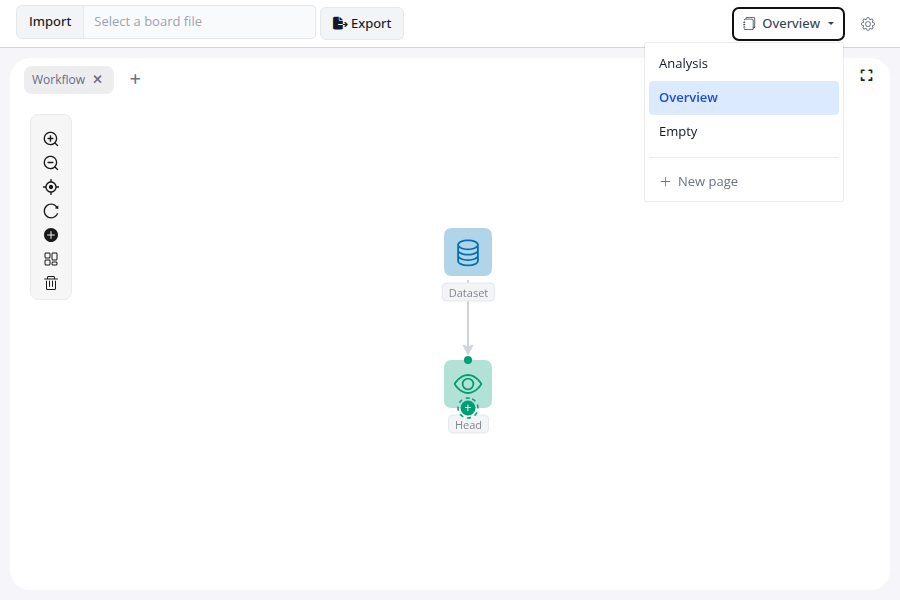
For the full set of shapes accepted by
new_dock_board(layouts = ...) (nested grids, tabbed panels,
active-view selection, the coercion rules that normalise everything to a
dock_layouts), see
vignette("layouts", package = "blockr.dock").
These binaries (installable software) and packages are in development.
They may not be fully stable and should be used with caution. We make no claims about them.
Health stats visible at Monitor.