The hardware and bandwidth for this mirror is donated by dogado GmbH, the Webhosting and Full Service-Cloud Provider. Check out our Wordpress Tutorial.
If you wish to report a bug, or if you are interested in having us mirror your free-software or open-source project, please feel free to contact us at mirror[@]dogado.de.



Several R packages exist for using the REDCap Application Program
Interface (API) such as, redcapAPI,
REDCapR,
and tidyREDCap.
However, REDCapSync
is the first “get-everything” REDCap R package that converts REDCap
projects into a standardized, API-efficient, and project-agnostic R6 object.
REDCapSync
unleashes the full power of the REDCap API even for the basic R user.
When a sync is performed, REDCapSync
uses a cache of previous saves, a user-defined directory, and the REDCap
log to only update data that changed since the last API call. Project
objects can be used for the best that R has to offer via statistics,
visualization, functions, shiny apps, and more!
The aims of REDCapSync
are to…
RosyREDCapBy leveraging the combined strengths of R and REDCap, users can maintain strong data pipelines that include statistics, visuals, and even shiny applications!
The stable release version can be installed from CRAN.
install.packages("REDCapSync")You can install the development version from GitHub with the pak. Windows users may
need to install RTools version 4.5 to use pak.
# install.packages("pak")
pak::pak("thecodingdocs/REDCapSync")
Alternatively, you can install the development version from GitHub
with the remotes
package.
# install.packages("remotes")
remotes::install_github("thecodingdocs/REDCapSync")
If you have any issues, try downloading the most recent version of R at RStudio and update all packages in RStudio. See thecodingdocs.com/r/getting-started.
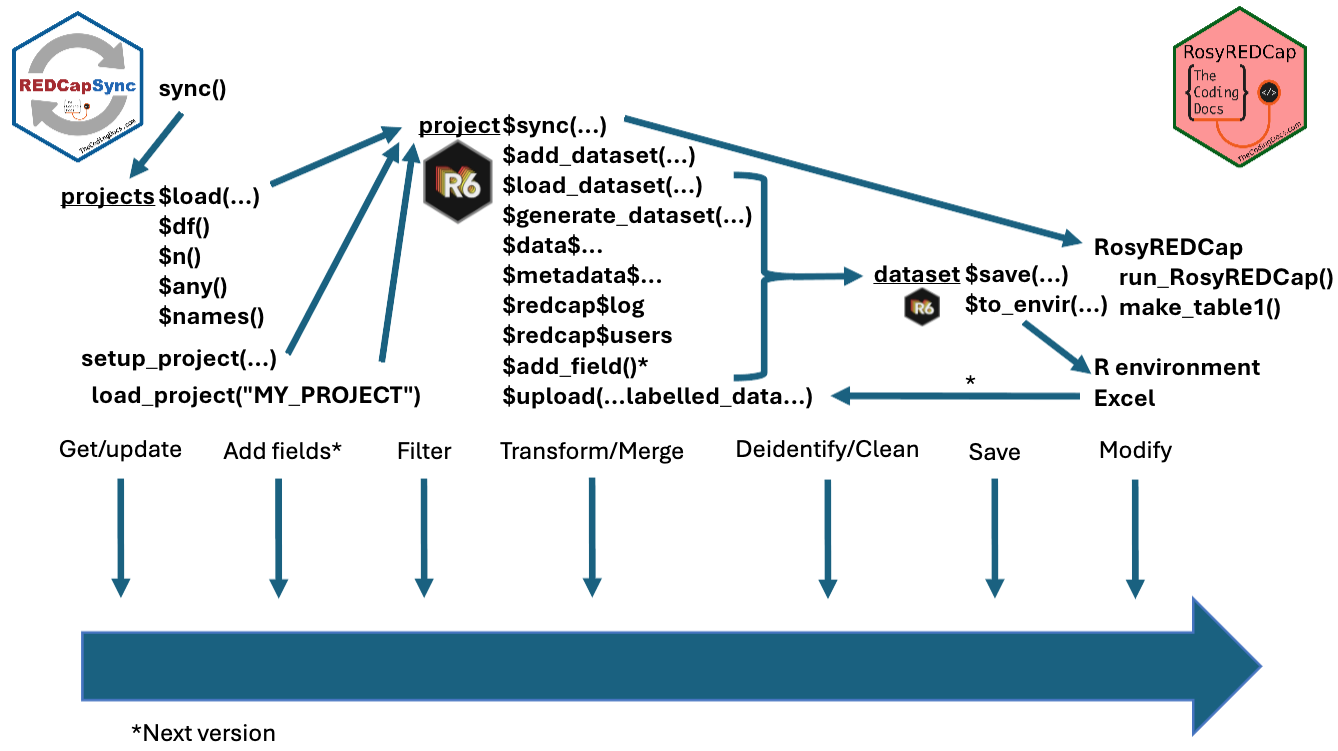
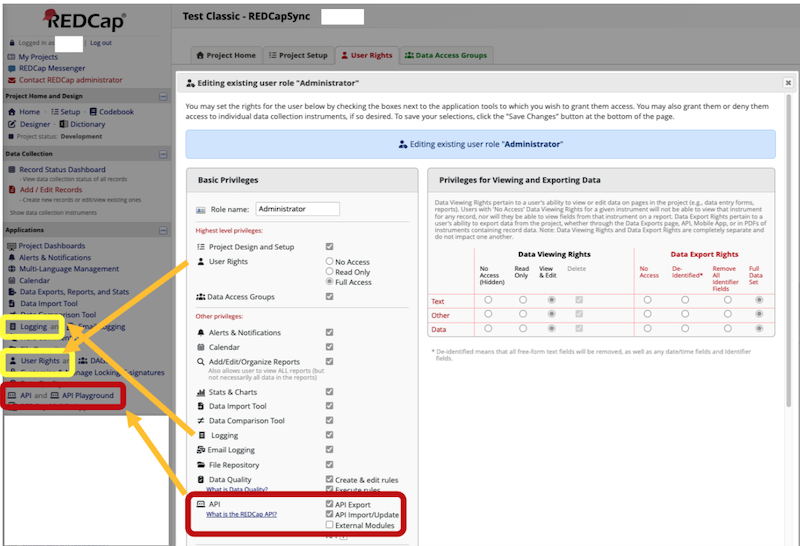
Getting started is as simple as 1.) setting your token, 2.) setting up a project, and 3.) running project$sync(). See Getting Started page for the basics!
# 1.) setting your token -------------------------------------------------------
Sys.setenv(REDCAPSYNC_FIRST_PROJECT = "YoUrNevErShaReToken") # put in console
# or WAY BETTER put this in your .Renviron file...
# REDCAPSYNC_FIRST_PROJECT = 'YoUrNevErShaReToken'
# Then save file, restart R session (`.rs.restartR()`) and library(REDCapSync)

# 2.) setting up a project -----------------------------------------------------
project <- setup_project(
  project_name = "FIRST_PROJECT",
  redcap_uri = "https://redcap.fake.edu/api/",             # same as REDCapR
  dir_path = getwd(),                            # choose appropriate folder
  sync_frequency = "daily",                          # only checks max daily
  get_entire_log = TRUE                       # for small or medium projects
)

# install.packages("keyring")
project$test_token()                    # will launch keyring if token fails

# 3.) running project$sync() ---------------------------------------------------
project$sync()

project$generate_dataset("custom", envir = globalenv())
For an in-depth demonstration of both REDCapSync and RosyREDCap, see RMed26-Demo.
If you wish to contribute to this software, use github issues and pull requests.

These binaries (installable software) and packages are in development.
They may not be fully stable and should be used with caution. We make no claims about them.
Health stats visible at Monitor.