The hardware and bandwidth for this mirror is donated by dogado GmbH, the Webhosting and Full Service-Cloud Provider. Check out our Wordpress Tutorial.
If you wish to report a bug, or if you are interested in having us mirror your free-software or open-source project, please feel free to contact us at mirror[@]dogado.de.


The Copernicus Data Space Ecosystem, is an open ecosystem that provides free instant access to a wide range of data and services from the Copernicus Sentinel missions and more on our planet’s land, oceans and atmosphere. This package provides entry points to several APIs allowing users to access the data directly in R.
Install CRAN release:
install.packages("CopernicusDataspace")Install latest developmental version from R-Universe:
install.packages("CopernicusDataspace", repos = c('https://pepijn-devries.r-universe.dev', 'https://cloud.r-project.org'))The Copernicus Data Space Ecosystem offers access to its services through several APIs. This package offers access via the following APIs. This README shows only essential methods for downloading data. For more detailed information consult the respective vignettes:
vignette("OData"),vignette("STAC"), andvignette("SentinelHub").When actually downloading files from the Copernicus Data Space
Ecosystem, you usually need some form of authentication. Examples below
use credentials stored as environment variables. For more information
about how to effectively authenticate download requests, please see
vignette("Authentication").
When you know the STAC identifier (asset_id) and the
asset name you wish to download, you can simply use the example shown
below. It will often speed you request up if you include the
collection id. When you don’t know these details, you
should first explore the catalogue. Please see
vignette("STAC") for more details on working with the STAC
catalogue.
library(CopernicusDataspace)
library(stars) ## For reading and plotting the downloaded file

## Only run this if an S3 secret is specified:
if (dse_has_s3_secret()) {

  filename  <- dse_stac_download(
    asset_id   = "Copernicus_DSM_COG_30_S69_00_W062_00_DEM",
    asset      = "data",
    collection = "cop-dem-glo-90-dged-cog",
    tempdir())

  tile_stac <- read_stars(filename)

  plot(tile_stac, col = hcl.colors(100), axes = TRUE)

}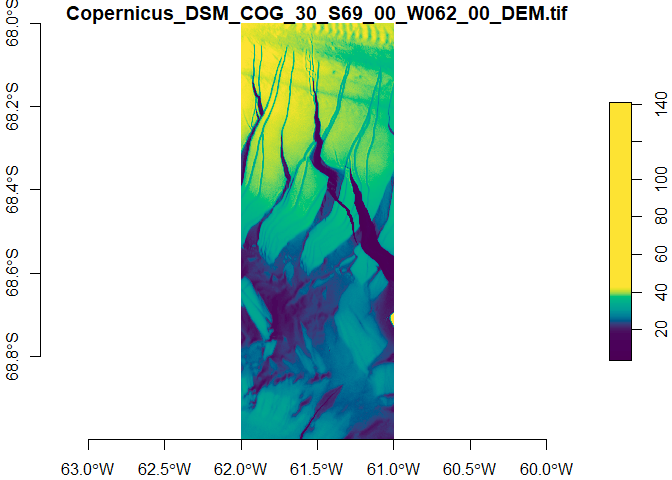
This produces a tile in the Southern Ocean near Antarctica.
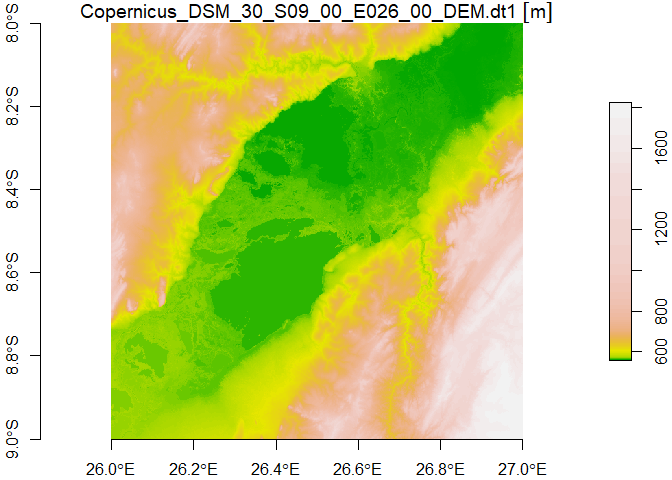
The example below briefly demonstrate how to download data using with
the OData API wrapped by this package. This produces a map of Lake
Upemba in Congo. For more extensive information about the API and
workflow check out vignette("OData").
## Only run this if client info is available:
if (dse_has_account()) {
  response <-
    dse_odata_download_path(
    product     = "2f497806-0101-5eea-83fa-c8f68bc56b0c",
    node_path   = paste(
      "DEM1_SAR_DTE_90_20101213T034716_20130408T035028_ADS_000000_5033.DEM",
      "Copernicus_DSM_30_S09_00_E026_00", "DEM",
      "Copernicus_DSM_30_S09_00_E026_00_DEM.dt1", sep = "/"),
    destination = tempdir())

  tile_odata <- read_stars(response$body)
  plot(tile_odata, col = terrain.colors(100), axes = TRUE)
}
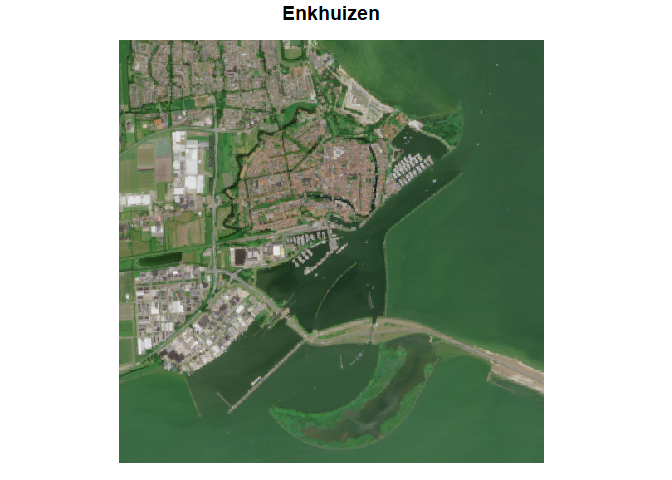
SentinelHub is a service that remotely processes raw Sentinel data
and returns the result. Below a quick demonstration of the process. For
more detailed information check vignette("SentinelHub")
## Only run this if client info is available:
if (dse_has_client_info()) {
  bounds <- c(5.261, 52.680, 5.319, 52.715)

  ## prepare input data:
  input <-
    dse_sh_prepare_input(
      bounds = bounds,
      time_range = c("2025-06-01 UTC", "2025-07-01 UTC")
    )

  ## prepare ouput format:
  output <- dse_sh_prepare_output(bbox = bounds)

  ## retrieve processing script:
  evalscript <- dse_sh_get_custom_script("/sentinel-2/l2a_optimized/")

  ## destination file:
  fl <- tempfile(fileext = ".tiff")

  ## send request and download result:
  dse_sh_process(input, output, evalscript, fl)

  ## read and plot result:
  enkhuizen <- read_stars(fl) |> suppressWarnings()
  plot(enkhuizen, rgb = 1:3, main = "Enkhuizen")
}
Understanding the naming logic of the functions in this package, will help you navigating through all features, and effectively use them.
Most function names in this package start with the acronym
dse (Data Space Ecosystem). This is done to avoid confusion
with other Copernicus packages (see below) and unintended masking of
other functions.
Exceptions are functions that (intentionally) mask functions from
other packages (like req_perform()), and functions that
implement generic functions from tidyverse packages (see
?tidy_verbs).
Functions are also grouped to highlight the specific API they
support. After the dse acronym, these function names
contain a reference to the relevant API (odata,
stac and sh (SentinelHub)). If a function name
starts with dse but is not followed by a reference to a
specific API, it will have a more generic purpose (like for instance
authorisation).
OpenEO is and will not be supported by the package at hand. It has a dedicated R package on CRAN: openeo, with additional documentation available at copernicus.eu. OpenEO allows to process data remotely and retrieve only processed data.
More R packages for exploring other Copernicus data services:
Please note that the CopernicusDataspace project is released with a Contributor Code of Conduct. By contributing to this project, you agree to abide by its terms.
This software has been developed as part of the statutory task programme “fisheries research” and is subsidised by the Dutch Ministry of Agriculture, Nature and Food Quality.
These binaries (installable software) and packages are in development.
They may not be fully stable and should be used with caution. We make no claims about them.
Health stats visible at Monitor.