
The hardware and bandwidth for this mirror is donated by dogado GmbH, the Webhosting and Full Service-Cloud Provider. Check out our Wordpress Tutorial.
If you wish to report a bug, or if you are interested in having us mirror your free-software or open-source project, please feel free to contact us at mirror[@]dogado.de.





spicy is an R package for frequency tables, cross-tabulations, association measures, summary tables, and labelled survey data workflows.
spicy helps you explore categorical, continuous, and labelled survey data in R. It provides readable, console-first outputs for survey research, descriptive statistics, and reporting workflows, including frequency tables, cross-tabulations with chi-squared tests and effect sizes, categorical and continuous summary tables, variable inspection, and codebooks.
With spicy, you can:
varlist() and
vl() for names, labels, values, classes, and missing
data.freq().cross_tab(), including percentages, chi-squared tests, and
effect sizes.cramer_v(),
phi(), gamma_gk(),
kendall_tau_b(), somers_d() and 6 other
coefficients; use assoc_measures() to compute the full set
at once.table_categorical() for console, gt, tinytable, flextable,
Excel, Word, or clipboard output.table_continuous() for console, gt, tinytable, flextable,
Excel, Word, or clipboard output.table_continuous_lm() for linear regression reporting:
classical / HC* / cluster-robust / bootstrap / jackknife variance, four
effect-size families (f², Cohen’s d, Hedges’ g, Hays’ omega²) with
noncentral CIs, optional additive covariate adjustment
with G-computation (Stata margins style) or equal-weight
(emmeans style) marginal means, weighted comparisons, and
console, gt, tinytable, flextable, Excel, Word, or clipboard
output.table_regression() for one or more lm or
glm fits side by side: classical / HC* / cluster-robust /
bootstrap / jackknife variance, four standardisation methods (plus
pseudo for glm), family-aware
exponentiate (OR / IRR / HR / RR / MR), Wald or
profile-likelihood CIs, average marginal effects on the response scale,
partial f² / η² / ω² / χ² effect
sizes, pseudo-R² family, hierarchical model comparisons,
multiple-comparison adjustment, and the same console / gt / tinytable /
flextable / Excel / Word / clipboard output.code_book() for labelled and survey-style datasets.label_from_names(), including LimeSurvey-style
headers.Works with labelled, factor,
ordered, Date, POSIXct, and other
common variable types. For a full introduction, see Getting
started with spicy.
Install the current CRAN release, recommended for most users:
install.packages("spicy")Install the latest r-universe build:
install.packages(
  "spicy",
  repos = c(
    "https://amaltawfik.r-universe.dev",
    "https://cloud.r-project.org"
  )
)
This installs spicy from r-universe when available; CRAN
is included only as a fallback for dependencies. The r-universe build
may be newer than the current CRAN release.
Install the development version from GitHub with
pak:
# install.packages("pak")
pak::pak("amaltawfik/spicy")The examples below use the bundled sochealth
dataset.
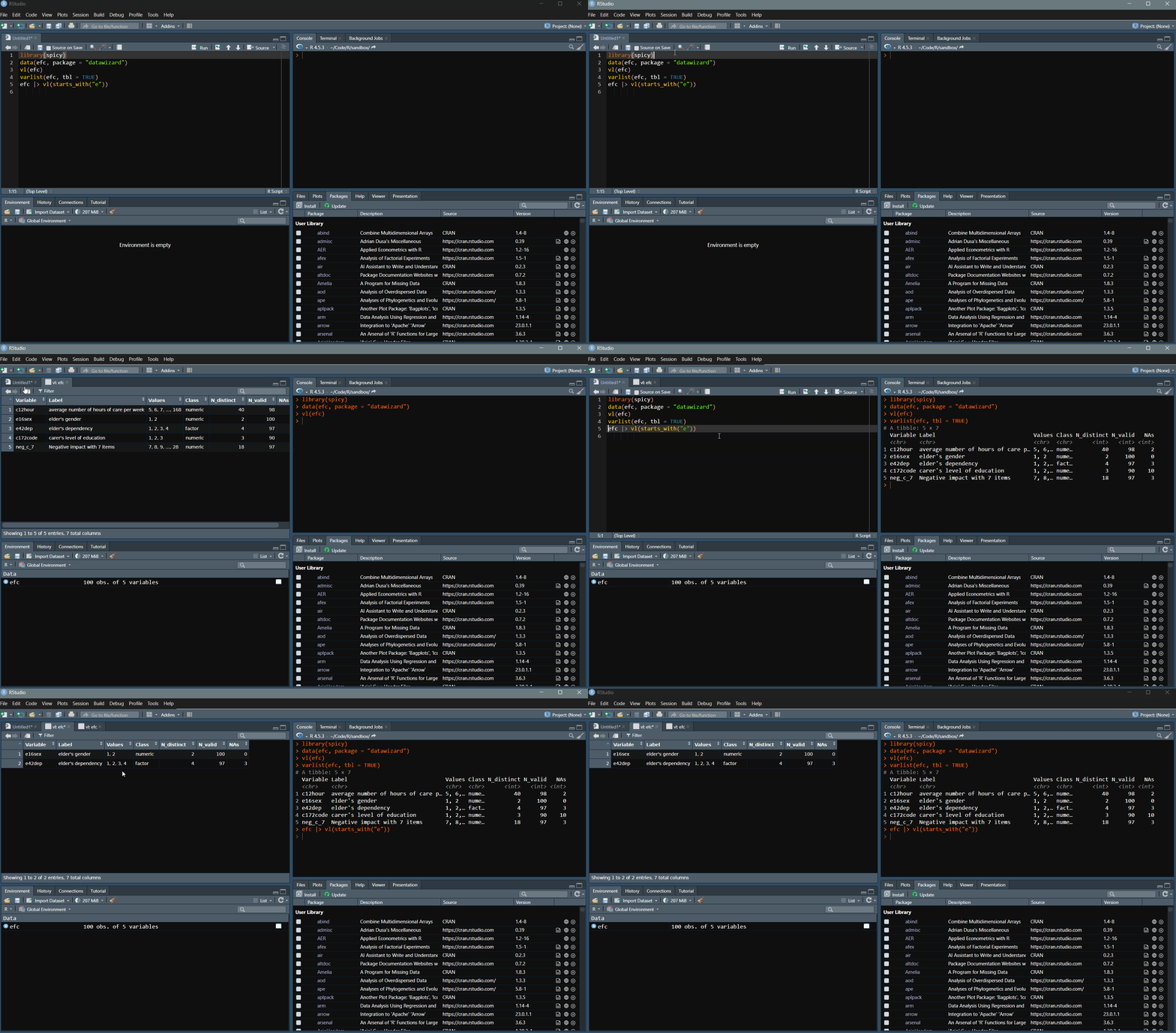
varlist(sochealth, tbl = TRUE)
#> # A tibble: 24 × 7
#>    Variable          Label                 Values Class N_distinct N_valid   NAs
#>    <chr>             <chr>                 <chr>  <chr>      <int>   <int> <int>
#>  1 sex               Sex                   Femal… fact…          2    1200     0
#>  2 age               Age (years)           25, 2… nume…         51    1200     0
#>  3 age_group         Age group             25-34… orde…          4    1200     0
#>  4 education         Highest education le… Lower… orde…          3    1200     0
#>  5 social_class      Subjective social cl… Lower… orde…          5    1200     0
#>  6 region            Region of residence   Centr… fact…          6    1200     0
#>  7 employment_status Employment status     Emplo… fact…          4    1200     0
#>  8 income_group      Household income gro… Low, … orde…          4    1182    18
#>  9 income            Monthly household in… 1000,… nume…       1052    1200     0
#> 10 smoking           Current smoker        No, Y… fact…          2    1175    25
#> # ℹ 14 more rowscode_book(
sochealth,
starts_with("bmi"),
values = TRUE,
include_na = TRUE
)See Explore
variables and build codebooks in R for more on
varlist(), vl(), and
code_book().
freq(sochealth, income_group)
#> Frequency table: income_group
#>
#>  Category   │ Values            Freq.    Percent    Valid Percent
#> ────────────┼─────────────────────────────────────────────────────
#>  Valid      │ Low                 247       20.6             20.9
#>             │ Lower middle        388       32.3             32.8
#>             │ Upper middle        328       27.3             27.7
#>             │ High                219       18.2             18.5
#>  Missing    │ NA                   18        1.5
#> ────────────┼─────────────────────────────────────────────────────
#>  Total      │                    1200      100.0            100.0
#>
#> Label: Household income group
#> Class: ordered, factor
#> Data: sochealth

cross_tab(sochealth, smoking, education, percent = "col")
#> Crosstable: smoking x education (Column %)
#>
#>  Values   │   Lower secondary    Upper secondary    Tertiary │   Total
#> ──────────┼──────────────────────────────────────────────────┼─────────
#>  No       │              69.6               78.7        84.9 │    78.8
#>  Yes      │              30.4               21.3        15.1 │    21.2
#> ──────────┼──────────────────────────────────────────────────┼─────────
#>  Total    │             100.0              100.0       100.0 │   100.0
#>  N        │               257                527         391 │    1175
#>
#> Chi-2(2) = 21.6, p <.001
#> Cramer's V = 0.14
See Frequency
tables and cross-tabulations in R for freq(),
cross_tab(), percentages, weights, and tests.
tbl <- xtabs(~ self_rated_health + education, data = sochealth)

# Quick scalar estimate
cramer_v(tbl)
#> [1] 0.1761697

# Detailed result with CI and p-value
cramer_v(tbl, detail = TRUE)
#> Estimate  CI lower  CI upper      p
#>    0.176     0.120     0.231  <.001
See Cramer’s V, Phi, and association measures in R for a guide on choosing the right measure.
table_categorical(
  sochealth,
  select = c(smoking, physical_activity),
  labels = c(
    smoking           = "Current smoker",
    physical_activity = "Physical activity"
  )
)
#> Categorical table
#>
#>  Variable            │   n      %
#> ─────────────────────┼───────────────
#>  Current smoker      │
#>    No                │  926    78.8
#>    Yes               │  249    21.2
#> ╌╌╌╌╌╌╌╌╌╌╌╌╌╌╌╌╌╌╌╌╌┼╌╌╌╌╌╌╌╌╌╌╌╌╌╌╌
#>  Physical activity   │
#>    No                │  650    54.2
#> Yes │ 550 45.8table_categorical(
sochealth,
select = c(smoking, physical_activity),
by = education,
labels = c(
smoking = "Current smoker",
physical_activity = "Physical activity"
)
)
#> Categorical table by education
#>
#> Variable │ Lower secondary n Lower secondary % Upper secondary n
#> ───────────────────┼─────────────────────────────────────────────────────────
#> Current smoker │
#> No │ 179 69.6 415
#> Yes │ 78 30.4 112
#> ╌╌╌╌╌╌╌╌╌╌╌╌╌╌╌╌╌╌╌┼╌╌╌╌╌╌╌╌╌╌╌╌╌╌╌╌╌╌╌╌╌╌╌╌╌╌╌╌╌╌╌╌╌╌╌╌╌╌╌╌╌╌╌╌╌╌╌╌╌╌╌╌╌╌╌╌╌
#> Physical activity │
#> No │ 177 67.8 310
#> Yes │ 84 32.2 229
#>
#> Variable │ Upper secondary % Tertiary n Tertiary % Total n
#> ───────────────────┼────────────────────────────────────────────────────
#> Current smoker │
#> No │ 78.7 332 84.9 926
#> Yes │ 21.3 59 15.1 249
#> ╌╌╌╌╌╌╌╌╌╌╌╌╌╌╌╌╌╌╌┼╌╌╌╌╌╌╌╌╌╌╌╌╌╌╌╌╌╌╌╌╌╌╌╌╌╌╌╌╌╌╌╌╌╌╌╌╌╌╌╌╌╌╌╌╌╌╌╌╌╌╌╌
#> Physical activity │
#> No │ 57.5 163 40.8 650
#> Yes │ 42.5 237 59.2 550
#>
#> Variable │ Total % p Cramer's V
#> ───────────────────┼────────────────────────────
#> Current smoker │ <.001 .14
#> No │ 78.8
#> Yes │ 21.2
#> ╌╌╌╌╌╌╌╌╌╌╌╌╌╌╌╌╌╌╌┼╌╌╌╌╌╌╌╌╌╌╌╌╌╌╌╌╌╌╌╌╌╌╌╌╌╌╌╌
#> Physical activity │ <.001 .21
#> No │ 54.2
#> Yes │ 45.8table_continuous(
sochealth,
select = c(bmi, life_sat_health)
)
#> Descriptive statistics
#>
#> Variable │ M SD Min Max 95% CI LL
#> ────────────────────────────────┼──────────────────────────────────────
#> Body mass index │ 25.93 3.72 16.00 38.90 25.72
#> Satisfaction with health (1-5) │ 3.55 1.25 1.00 5.00 3.48
#>
#> Variable │ 95% CI UL n
#> ────────────────────────────────┼─────────────────
#> Body mass index │ 26.14 1188
#> Satisfaction with health (1-5) │ 3.62 1192table_continuous(
sochealth,
select = c(bmi, life_sat_health),
by = education
)
#> Descriptive statistics
#>
#> Variable │ Group M SD Min Max
#> ────────────────────────────────┼────────────────────────────────────────────
#> Body mass index │ Lower secondary 28.09 3.47 18.20 38.90
#> │ Upper secondary 26.02 3.43 16.00 37.10
#> │ Tertiary 24.39 3.52 16.00 33.00
#> ╌╌╌╌╌╌╌╌╌╌╌╌╌╌╌╌╌╌╌╌╌╌╌╌╌╌╌╌╌╌╌╌┼╌╌╌╌╌╌╌╌╌╌╌╌╌╌╌╌╌╌╌╌╌╌╌╌╌╌╌╌╌╌╌╌╌╌╌╌╌╌╌╌╌╌╌╌
#> Satisfaction with health (1-5) │ Lower secondary 2.71 1.20 1.00 5.00
#> │ Upper secondary 3.53 1.19 1.00 5.00
#> │ Tertiary 4.11 1.04 1.00 5.00
#>
#> Variable │ Group 95% CI LL 95% CI UL n
#> ────────────────────────────────┼────────────────────────────────────────────
#> Body mass index │ Lower secondary 27.66 28.51 260
#> │ Upper secondary 25.73 26.31 534
#> │ Tertiary 24.04 24.74 394
#> ╌╌╌╌╌╌╌╌╌╌╌╌╌╌╌╌╌╌╌╌╌╌╌╌╌╌╌╌╌╌╌╌┼╌╌╌╌╌╌╌╌╌╌╌╌╌╌╌╌╌╌╌╌╌╌╌╌╌╌╌╌╌╌╌╌╌╌╌╌╌╌╌╌╌╌╌╌
#> Satisfaction with health (1-5) │ Lower secondary 2.57 2.86 259
#> │ Upper secondary 3.43 3.63 534
#> │ Tertiary 4.01 4.21 399
#>
#> Variable │ Group p
#> ────────────────────────────────┼────────────────────────
#> Body mass index │ Lower secondary <.001
#> │ Upper secondary
#> │ Tertiary
#> ╌╌╌╌╌╌╌╌╌╌╌╌╌╌╌╌╌╌╌╌╌╌╌╌╌╌╌╌╌╌╌╌┼╌╌╌╌╌╌╌╌╌╌╌╌╌╌╌╌╌╌╌╌╌╌╌╌
#> Satisfaction with health (1-5) │ Lower secondary <.001
#> │ Upper secondary
#> │ Tertiarytable_continuous_lm(
sochealth,
select = c(wellbeing_score, bmi),
by = sex,
vcov = "HC3",
output = "data.frame"
)
#> Variable M (Female) M (Male)
#> wellbeing_score WHO-5 wellbeing index (0-100) 67.16194 71.04879
#> bmi Body mass index 25.68506 26.19685
#> Δ (Male - Female) 95% CI LL 95% CI UL p R²
#> wellbeing_score 3.8868576 2.12265210 5.6510631 1.670572e-05 0.015475137
#> bmi 0.5117882 0.08904596 0.9345305 1.769614e-02 0.004728908
#> n
#> wellbeing_score 1200
#> bmi 1188fit <- lm(wellbeing_score ~ age + sex + smoking, data = sochealth)
table_regression(fit)
#> Linear regression: wellbeing_score
#>
#> Variable │ B SE 95% CI p
#> ─────────────────┼──────────────────────────────────────
#> (Intercept) │ 65.20 1.66 [61.95, 68.45] <.001
#> age │ 0.05 0.03 [-0.01, 0.11] .130
#> sex: │
#> Female (ref.) │ — — — —
#> Male │ 3.86 0.91 [ 2.08, 5.63] <.001
#> smoking: │
#> No (ref.) │ — — — —
#> Yes │ -1.72 1.11 [-3.89, 0.45] .121
#> ╌╌╌╌╌╌╌╌╌╌╌╌╌╌╌╌╌┼╌╌╌╌╌╌╌╌╌╌╌╌╌╌╌╌╌╌╌╌╌╌╌╌╌╌╌╌╌╌╌╌╌╌╌╌╌╌
#> n │ 1175
#> R² │ 0.02
#> Adj.R² │ 0.02
#>
#> Note. Linear regression.
#> Std. errors: classical (OLS).See Categorical
summary tables in R for categorical summaries, Continuous
summary tables in R for continuous summaries and group comparisons,
Model-based
continuous summary tables in R for weighted or robust linear-model
reporting, Regression
coefficient tables in R for lm and glm
coefficient tables, and Summary
tables for APA-style reporting for an overview of summary
tables.
df <- data.frame(
  x1 = c(10, NA, 30, 40, 50),
  x2 = c(5, NA, 15, NA, 25),
  x3 = c(NA, 30, 20, 50, 10)
)

mean_n(df)
#> [1]       NA       NA 21.66667       NA 28.33333
sum_n(df, min_valid = 2)
#> [1] 15 NA 65 90 85
count_n(df, special = "NA")
#> [1] 1 2 0 1 0
See Getting
started with spicy for a longer workflow using
mean_n(), sum_n(), and
count_n().
# LimeSurvey-style headers: "code. label"
df <- tibble::tibble(
  "age. Age of respondent" = c(25, 30),
  "score. Total score" = c(12, 14)
)
out <- label_from_names(df)
labelled::var_label(out)
#> $age
#> [1] "Age of respondent"
#>
#> $score
#> [1] "Total score"
See Explore
variables and build codebooks in R for more on
label_from_names(), varlist(), and
code_book().
If you are looking for a specific workflow, start with these vignettes:
Key reference pages:
varlist()code_book()label_from_names()freq()cross_tab()cramer_v()table_categorical()table_continuous()table_continuous_lm()table_regression()mean_n()sum_n()count_n()To cite spicy in a publication or teaching material:
citation("spicy") to generate the current BibTeX
entry.MIT. See LICENSE for details.
These binaries (installable software) and packages are in development.
They may not be fully stable and should be used with caution. We make no claims about them.
Health stats visible at Monitor.