The hardware and bandwidth for this mirror is donated by dogado GmbH, the Webhosting and Full Service-Cloud Provider. Check out our Wordpress Tutorial.
If you wish to report a bug, or if you are interested in having us mirror your free-software or open-source project, please feel free to contact us at mirror[@]dogado.de.


{cnefetools} provides helper functions to efficiently work with the Brazilian National Address File for Statistical Purposes (Cadastro Nacional de Endereços para Fins Estatísticos, CNEFE), an address-level dataset released by the Brazilian Institute of Geography and Statistics (Instituto Brasileiro de Geografia e Estatística, IBGE).
Install the stable version from CRAN:
install.packages("cnefetools")To install the development version from GitHub:
# install.packages("pak")
pak::pak("pedreirajr/cnefetools")

# or
# install.packages("remotes")
remotes::install_github("pedreirajr/cnefetools")| Function | Description |
|---|---|
read_cnefe() |
Downloads and reads CNEFE data for a municipality; returns an Arrow
table or sf object |
cnefe_counts() |
Aggregates address counts to H3 hexagons or user-provided polygons |
compute_lumi() |
Computes land-use mix indices on H3 hexagons or user-provided polygons |
tracts_to_h3() |
Dasymetric interpolation of census tract variables to an H3 grid via CNEFE dwelling points |
tracts_to_polygon() |
Dasymetric interpolation of census tract variables to user-provided polygons via CNEFE dwelling points |
cnefe_doc() |
Opens the official CNEFE methodological note (PDF) |
cnefe_dictionary() |
Opens the official CNEFE variable dictionary (Excel) |
clear_cache_muni(),
clear_cache_tracts() |
Delete cached CNEFE ZIP files or census tract Parquet files from the user cache directory |
read_cnefe() downloads and reads the CNEFE CSV for a
municipality, returning an Arrow table by default:
library(cnefetools)
library(dplyr)

# Read CNEFE data for Salvador as an Arrow table
tab_ssa <- read_cnefe(2927408, cache = TRUE)

tab_ssa |>
  collect() |> # materialize the arrow table in R
  tibble() |>
  head()
#> # A tibble: 6 × 34
#>   COD_UNICO_ENDERECO COD_UF COD_MUNICIPIO COD_DISTRITO COD_SUBDISTRITO COD_SETOR
#>                <int>  <int>         <int>        <int>         <int64> <chr>
#> 1          222386741     29       2927408    292740805     29274080518 29274080…
#> 2           27995350     29       2927408    292740805     29274080522 29274080…
#> 3           28034841     29       2927408    292740805     29274080522 29274080…
#> 4          217544957     29       2927408    292740805     29274080518 29274080…
#> 5          217639781     29       2927408    292740805     29274080526 29274080…
#> 6          217639701     29       2927408    292740805     29274080526 29274080…
#> # ℹ 28 more variables: NUM_QUADRA <int>, NUM_FACE <int>, CEP <int>,
#> #   DSC_LOCALIDADE <chr>, NOM_TIPO_SEGLOGR <chr>, NOM_TITULO_SEGLOGR <chr>,
#> #   NOM_SEGLOGR <chr>, NUM_ENDERECO <int>, DSC_MODIFICADOR <chr>,
#> #   NOM_COMP_ELEM1 <chr>, VAL_COMP_ELEM1 <chr>, NOM_COMP_ELEM2 <chr>,
#> #   VAL_COMP_ELEM2 <chr>, NOM_COMP_ELEM3 <chr>, VAL_COMP_ELEM3 <chr>,
#> #   NOM_COMP_ELEM4 <chr>, VAL_COMP_ELEM4 <chr>, NOM_COMP_ELEM5 <chr>,
#> #   VAL_COMP_ELEM5 <chr>, LATITUDE <dbl>, LONGITUDE <dbl>, …
Setting output = "sf" returns an sf object
instead. The example below reads data for Salvador, filters religious
facilities (COD_ESPECIE == 8), and plots them:
library(sf)
library(ggplot2)

# Reading CNEFE data
tab_ssa_sf <- read_cnefe(
  code_muni = 2927408,
  output = "sf",
  cache = TRUE
  )

# Filtering religious establishments
temples_ssa <- tab_ssa_sf |>
  filter(COD_ESPECIE == 8)

# Ploting religious establishments points for Salvador
ggplot() +
  geom_sf(data = temples_ssa, size = 0.3, alpha = 0.6) +
  coord_sf() +
  theme_minimal()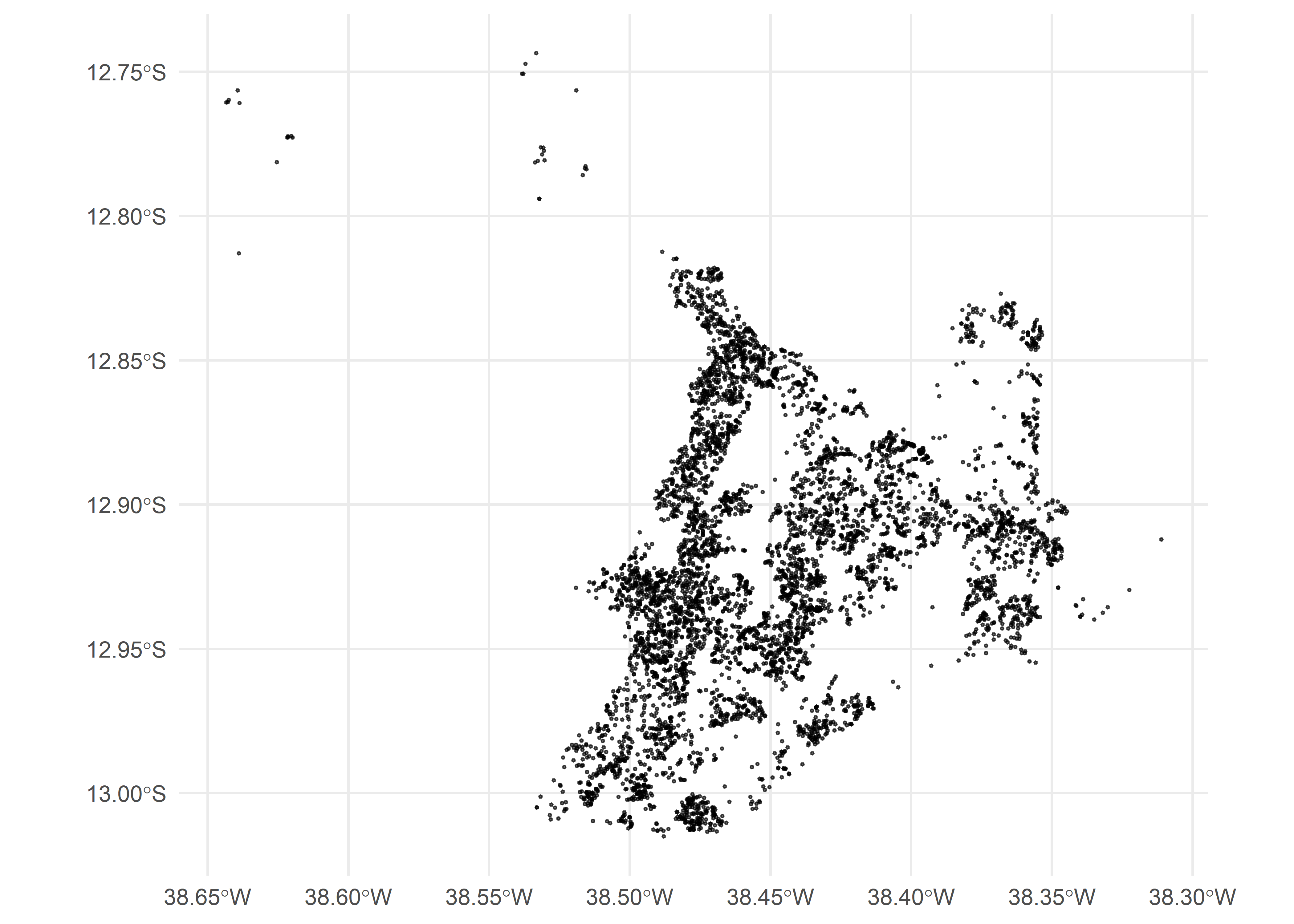
Warning: For large municipalities, CNEFE may contain more than 1 million address points. Plotting all coordinates at once can be slow and memory-intensive, so consider filtering or sampling before creating maps.
By default, cache = TRUE stores the downloaded ZIP file
in a user-level cache directory specific to this package. If you prefer
to avoid persistent caching, set:
tab_ssa <- read_cnefe(code_muni = 2927408, cache = FALSE)In this case, the ZIP file is stored in a temporary location and removed after reading.
{cnefetools} includes local copies of the official methodological note and the variable dictionary for the 2022 CNEFE released by IBGE.
# Open the official methodological note (PDF)
cnefe_doc(year = 2022)

# Open the official variable dictionary (.xls spreadsheet)
cnefe_dictionary(year = 2022)cnefe_counts()cnefe_counts() aggregates CNEFE address points into
spatial units and returns an sf object with counts by
address category (addr_type1 to addr_type8).
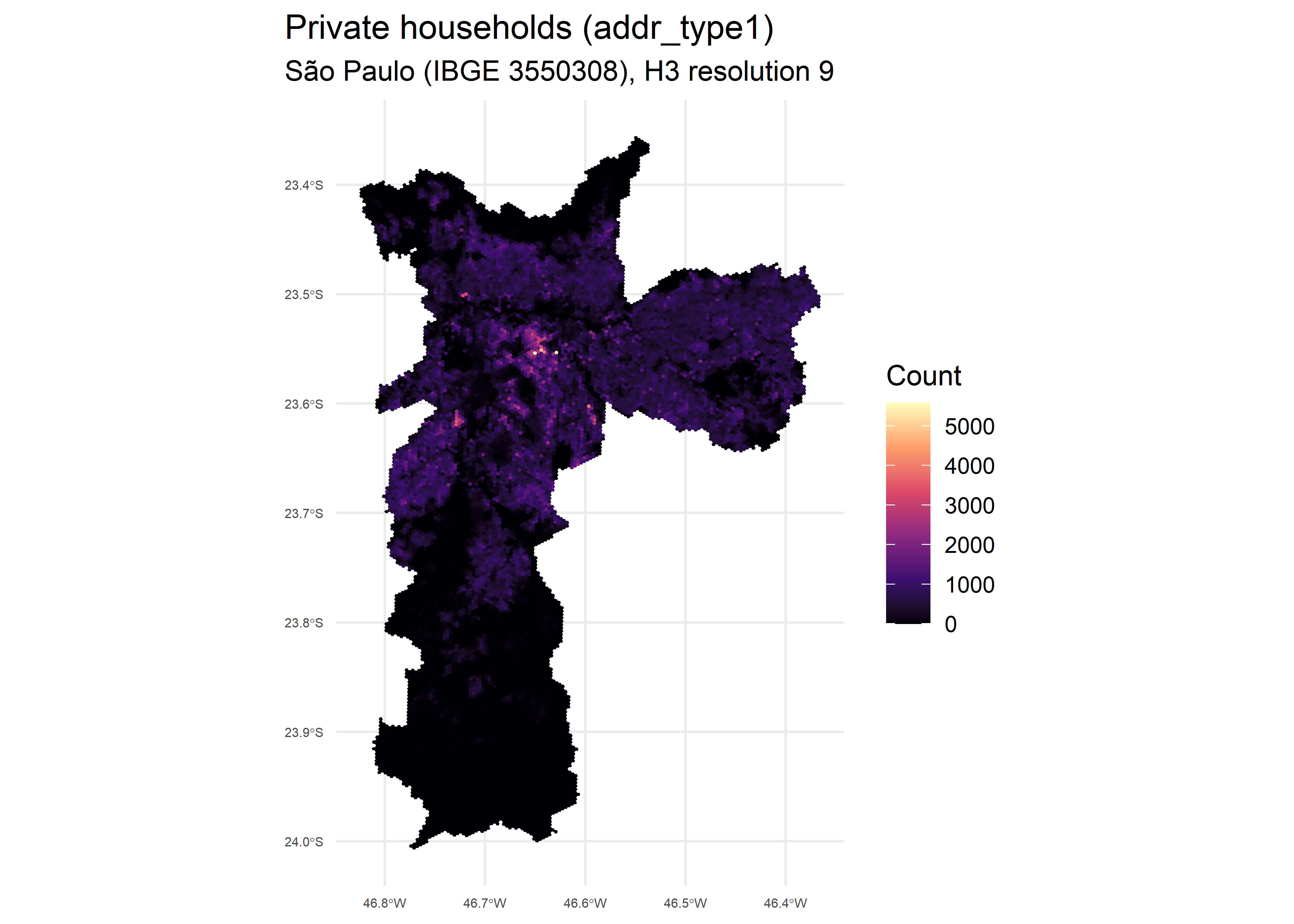
Below is an example using H3 hexagons for São Paulo at resolution 9:
library(cnefetools)
library(sf)
library(ggplot2)

# Producing CNEFE counts
hex_sp <- cnefe_counts(
  code_muni = 3550308,
  h3_resolution = 9,
  cache = TRUE,
  verbose = TRUE
  )
Below we plot the count of private households
(addr_type1) per hexagon:
# Plotting private households (addr_type1) for São Paulo
ggplot(hex_sp) +
  geom_sf(aes(fill = addr_type1), color = NA) +
  scale_fill_viridis_c(option = "magma") +
  coord_sf() +
  labs(
    fill = "Count",
    title = "Private households (addr_type1)",
    subtitle = "São Paulo (IBGE 3550308), H3 resolution 9"
  ) +
  theme_minimal()+
  theme(
    plot.title.position = "plot",
    axis.text.x = element_text(size = 5),
    axis.text.y = element_text(size = 5)
  )
cnefe_counts() also supports
polygon_type = "user" to aggregate counts to custom
polygons instead of H3 hexagons. See the cnefe_counts
article for details.
compute_lumi()compute_lumi() computes land-use mix indicators on
spatial units for any municipality covered by the 2022 CNEFE dataset (Pedreira
Junior et al., 2025). Available indicators include the Entropy Index
(ei), the Herfindahl-Hirschman Index (hhi),
the Balance Index (bal), the Index of Concentration at
Extremes (ice), an adapted HHI (hhi_adp), and
the Bidirectional Global-centered Balance Index (bgbi).
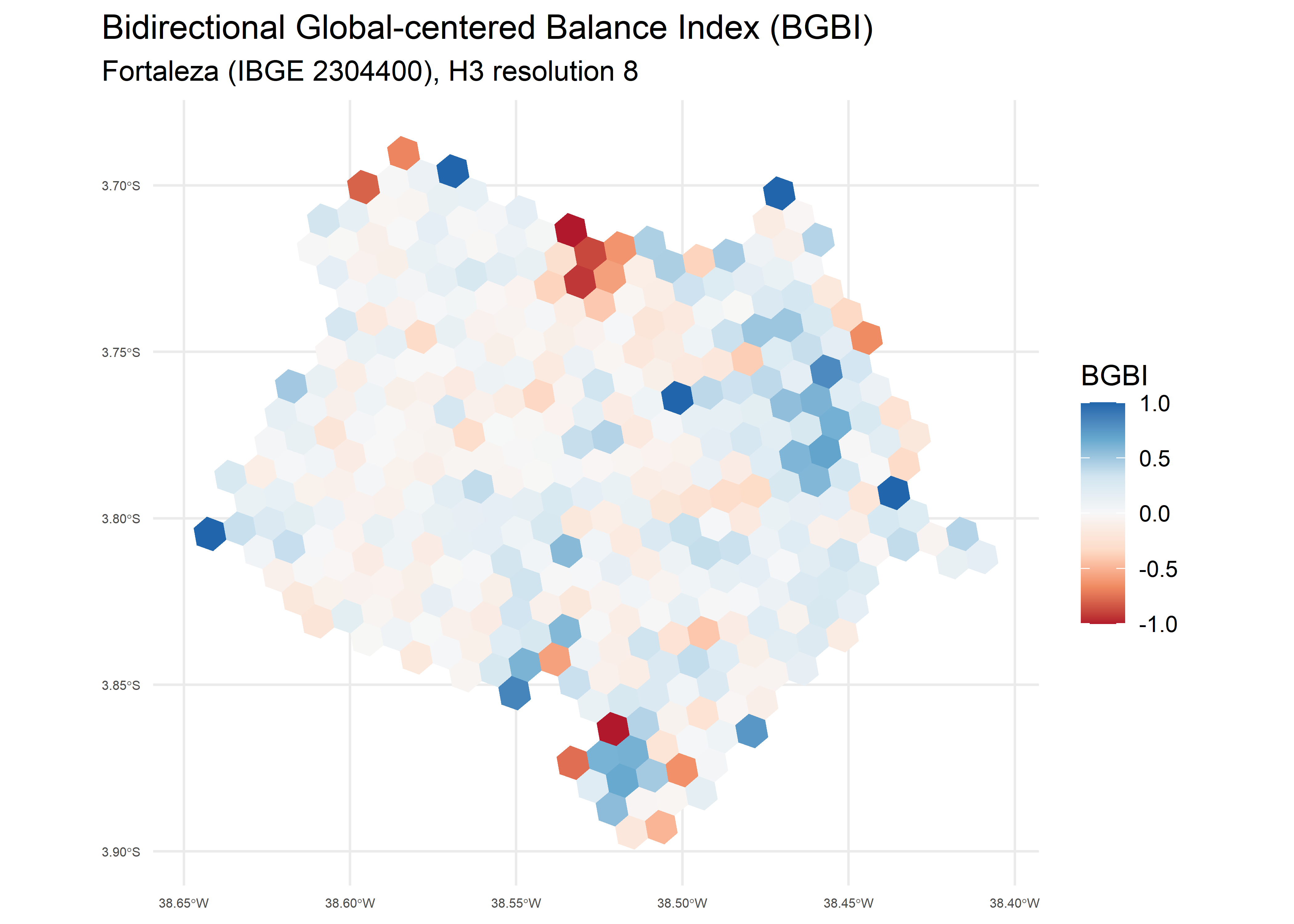
Below is an example for Fortaleza at H3 resolution 8:
library(cnefetools)
library(sf)
library(ggplot2)

# Computing land use mix indices
lumi_ftl <- compute_lumi(
  code_muni = 2304400,
  h3_resolution = 8,
  cache = TRUE,
  verbose = TRUE
  )
Below we plot the Bidirectional Global-centered Balance Index (BGBI), where positive values indicate residential dominance and negative values indicate non-residential dominance:
# Plotting the BGBI index
ggplot(lumi_ftl) +
  geom_sf(aes(fill = bgbi), color = NA) +
  scale_fill_distiller(
    type = "div",
    palette = "RdBu",
    direction = 1
  ) +
  coord_sf() +
  labs(
    fill = "BGBI",
    title = "Bidirectional Global-centered Balance Index (BGBI)",
    subtitle = "Fortaleza (IBGE 2304400), H3 resolution 8"
  ) +
  theme_minimal()+
  theme(
    plot.title.position = "plot",
    axis.text.x = element_text(size = 5),
    axis.text.y = element_text(size = 5)
  )
compute_lumi() also supports
polygon_type = "user" to compute indices on custom
polygons. See the compute_lumi
article for details.
tracts_to_h3()tracts_to_h3() performs a dasymetric interpolation,
considering two stages: first, census tract totals are allocated to
individual CNEFE dwelling points inside each tract; then, the allocated
values are aggregated to an H3 grid at the chosen resolution. This
leverages the fine-grained spatial distribution of addresses in CNEFE to
produce more realistic sub-tract estimates than simple areal
weighting.
library(cnefetools)
library(ggplot2)

# Performing dasymetric interpolation
rec_hex <- tracts_to_h3(
  code_muni = 2611606,
  h3_resolution = 9,
  vars = c("pop_ph", "avg_inc_resp"),
  cache = TRUE,
  verbose = TRUE
)
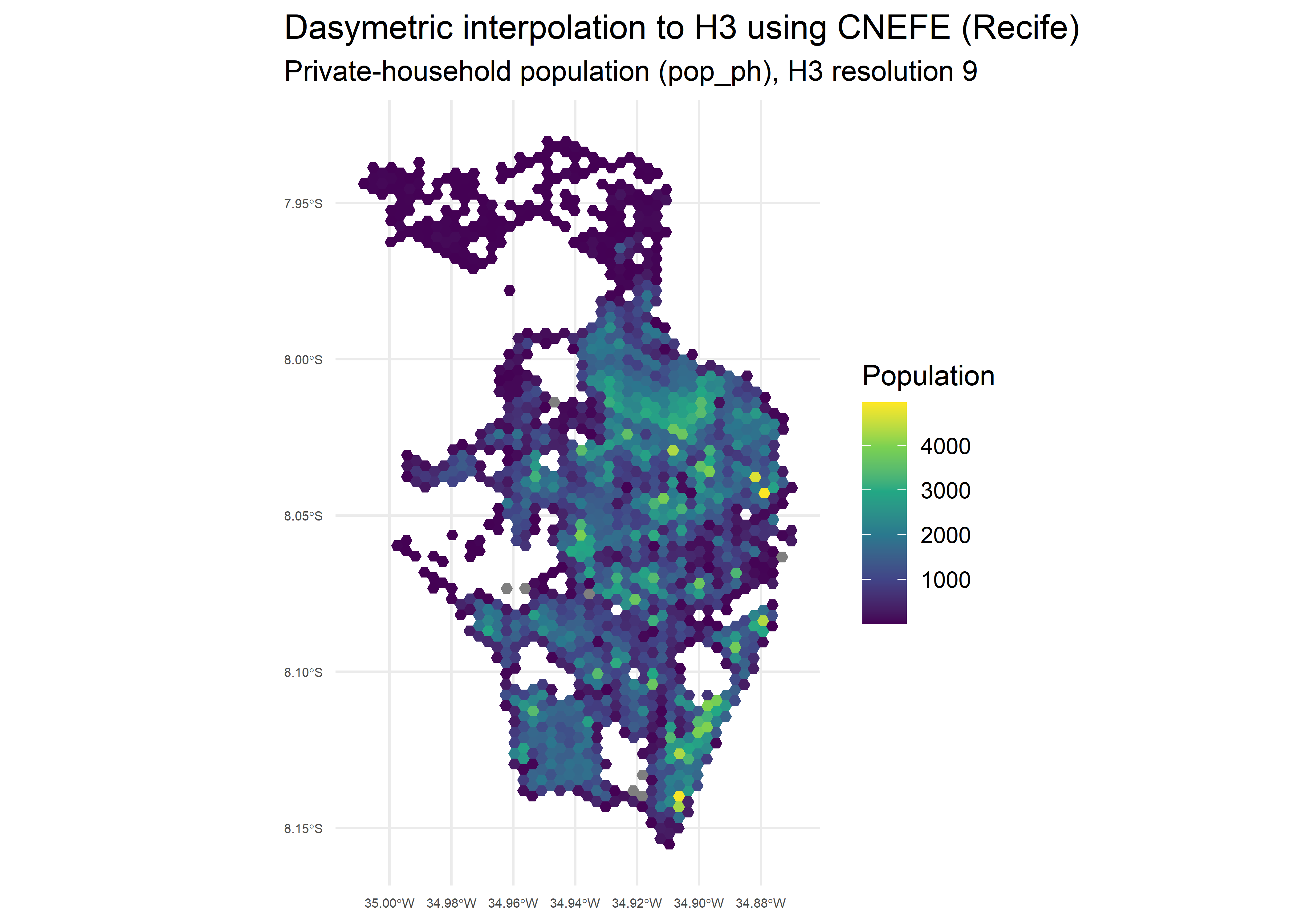
The resulting H3 grid can be mapped to visualize the spatial
distribution of each variable. Below we plot the private-household
population (pop_ph):
ggplot(rec_hex) +
  geom_sf(aes(fill = pop_ph), color = NA) +
  scale_fill_viridis_c() +
  coord_sf() +
  labs(
    title = "Dasymetric interpolation to H3 using CNEFE (Recife)",
    subtitle = "Private-household population (pop_ph), H3 resolution 9",
    fill = "Population"
  ) +
  theme_minimal() +
  theme(
    plot.title.position = "plot",
    axis.text.x = element_text(size = 5),
    axis.text.y = element_text(size = 5)
  )
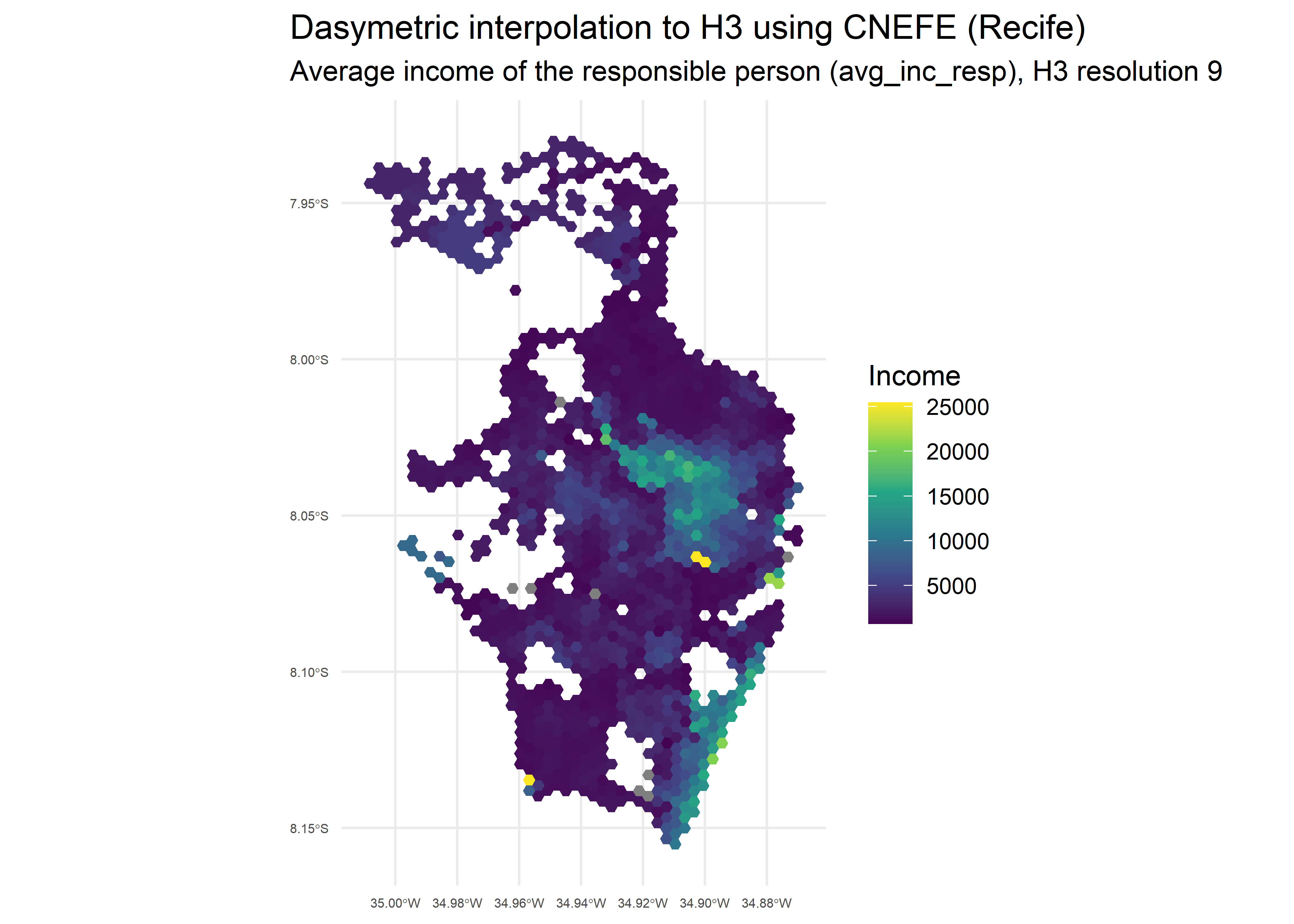
And the average income of the household head
(avg_inc_resp):
ggplot(rec_hex) +
  geom_sf(aes(fill = avg_inc_resp), color = NA) +
  scale_fill_viridis_c() +
  coord_sf() +
  labs(
    title = "Dasymetric interpolation to H3 using CNEFE (Recife)",
    subtitle = "Average income of the responsible person (avg_inc_resp), H3 resolution 9",
    fill = "Income"
  ) +
  theme_minimal() +
  theme(
    plot.title.position = "plot",
    axis.text.x = element_text(size = 5),
    axis.text.y = element_text(size = 5)
  )
The full list of available variables is documented in the
tracts_variables_ref dataset (see
?tracts_variables_ref). For allocation rules and diagnostic
details, see the tracts_to
article.
tracts_to_polygon()tracts_to_polygon() follows the same two-stage workflow
as tracts_to_h3(), but aggregates the allocated values to
user-provided polygons (e.g. neighborhoods, administrative divisions, or
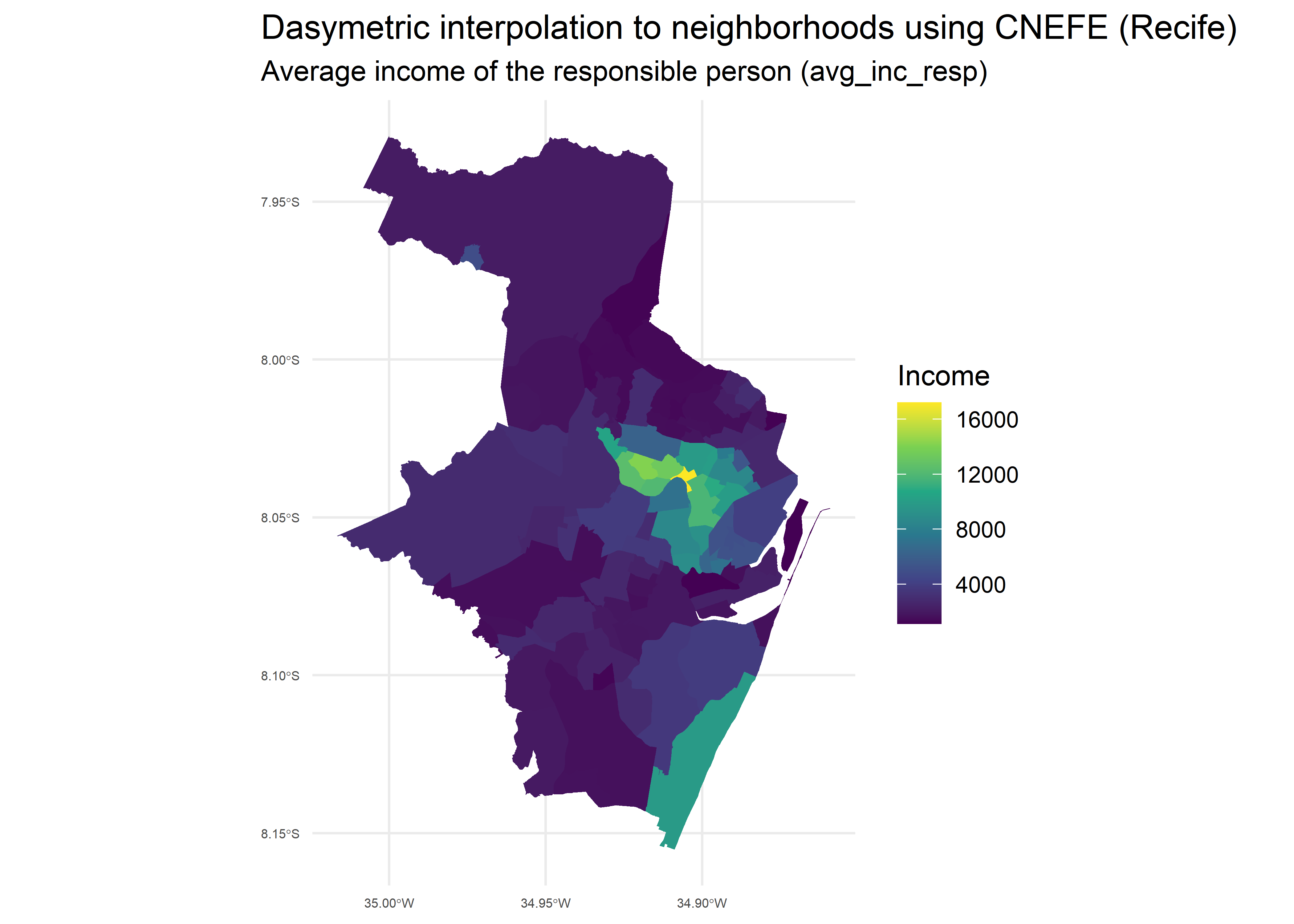
custom areas) instead of an H3 grid. Let’s generate the neighborhoods of
Recife with the read_neighborhood() function from the
geobr package and interpolate the average income of
household heads per neighborhood:
library(geobr)

# Reading neighborhoods from geobr package
rec_nei <- read_neighborhood(year = 2022, simplified = F, showProgress = F) |>
  filter(name_muni == 'Recife')

# Dasymetric interpolation to neighborhoods
rec_poly <- tracts_to_polygon(
  code_muni = 2611606,
  polygon = rec_nei,
  vars = c("pop_ph", "avg_inc_resp"),
  cache = TRUE,
  verbose = F
)
Below we plot the interpolated average income of the household head
(avg_inc_resp) at the neighborhood level:
# Plotting variables at the neighborhood level
ggplot(rec_poly) +
  geom_sf(aes(fill = avg_inc_resp), color = NA) +
  scale_fill_viridis_c() +
  coord_sf() +
  labs(
    title = "Dasymetric interpolation to neighborhoods using CNEFE (Recife)",
    subtitle = "Average income of the responsible person (avg_inc_resp)",
    fill = "Income"
  ) +
  theme_minimal() +
  theme(
    plot.title.position = "plot",
    axis.text.x = element_text(size = 5),
    axis.text.y = element_text(size = 5)
  )
See the tracts_to article for details.
Under the hood, {cnefetools} uses DuckDB as its default backend to perform spatial operations efficiently, with speedups of up to 20x over pure-R code depending on the number of address points and the size of the spatial units. This is made possible by three DuckDB extensions:
The R package duckspatial
also bridges sf objects and DuckDB’s spatial extension,
enabling seamless transfers between R and DuckDB.
All extensions are installed and loaded automatically on first use. A
pure-R fallback (backend = "r") is also available, using
h3jsr and sf for the same operations on
cnefe_counts() and compute_lumi() functions
(slower, but without the DuckDB dependency).
While caching speeds up repeated analyses by avoiding redundant downloads, users may want to free up disk space or force a fresh download. {cnefetools} provides two dedicated functions for fine-grained control over the local cache, allowing you to remove cached files selectively or all at once.
clear_cache_muni() deletes cached CNEFE ZIP files from
the user cache directory. You can remove all cached files at once or
target a specific municipality by its seven-digit IBGE code:
clear_cache_muni()          # delete all cached CNEFE ZIPs
clear_cache_muni(2919207)   # delete only the ZIP for Lauro de Freitas-BA
clear_cache_tracts() removes cached census tract Parquet
files. You can filter by state using a two-letter UF abbreviation, a
two-digit numeric state code, or a seven-digit municipality code
(resolved to its state automatically):
clear_cache_tracts()        # delete all cached census tract Parquets
clear_cache_tracts("BA")    # delete only the Parquet for Bahia
clear_cache_tracts(29)      # same, using the numeric state code
clear_cache_tracts(2919207) # same, using a municipality codeIf you use {cnefetools} in your work, please cite the associated preprint:
Pedreira Jr., J. U.; Louro, T. V.; Assis, L. B. M.; Brito, P. L. Measuring land use mix with address-level census data (2025). engrXiv. https://engrxiv.org/preprint/view/5975
These binaries (installable software) and packages are in development.
They may not be fully stable and should be used with caution. We make no claims about them.
Health stats visible at Monitor.